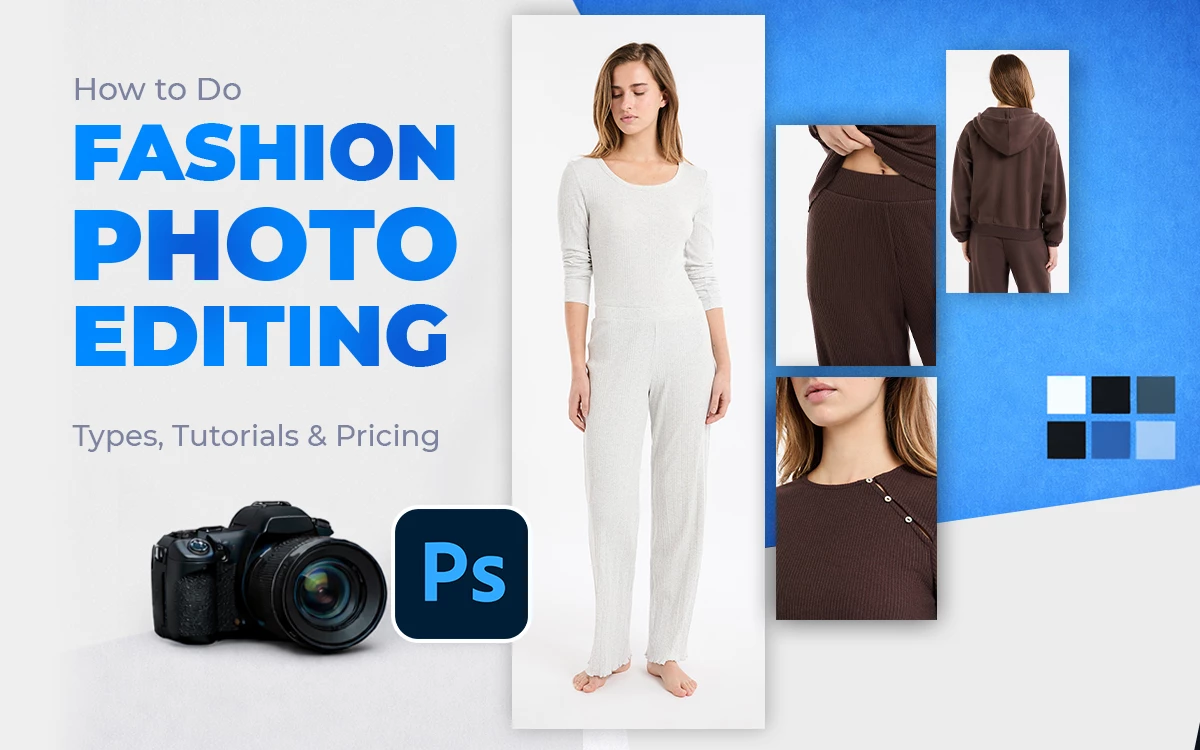
Fashion photo editing refers to the image processing applied to improve fashion images to increase product purchases. There are different types of fashion photo editing, including face photo editing, body reshaping, skin retouching, and teeth whitening, among others. It is used for creating a strong first impression, ensuring accurate color correction, building a brand, and increasing sales. Professional photo editors use photo editing software such as Adobe Photoshop to edit images. The fashion industry uses outsourcing as a reliable option to ensure quality images for fashion products.
What you’ll learn in this article
What is Fashion Photo Editing?
Fashion photo editing is the process of enhancing the quality and appearance of fashion items such as apparel, shoes, bags, wristwatches, and fashion accessories to make them polished, high-end, and branded. Fashion image editors perform color correction, model’s body shaping, shadow creation, image cleanup, background adjustment, product glow-up, etc, so that the edited version becomes ready to publish visuals for e-commerce, online marketing, social media, etc.
What are the Different Types of Fashion Photo Editing?
The different types of fashion photo editing include face photo editing, body reshaping, skin retouching, teeth whitening, beauty retouching, hair masking, magazine photo editing, makeup enhancement, clothing & fabric editing, accessories and product enhancement, artistic photo manipulation, and photo composition.
- Face Photo Editing
Face photo editing refers to balancing skin tones, correcting blemishes, refining facial structure, and overall improving symmetry so that it enhances the model’s appeal. The process includes using Liquify, Dodge & Burn, and frequency separation.
- Body Reshaping
Body reshaping stands for subtle adjustments to posture, fit, and body proportions to make the models’ bodies appear as a flattering silhouette. The process includes Liquify, Transform, and non-destructive masking tools.
- Skin Retouching
Skin retouching is the removal of temporary marks, uneven tones, blemishes, shadows, color & tone adjustments, while preserving natural texture. The process to retouch skin involves frequency separation, healing tools, and dodge & burn techniques.
- Teeth Whitening
The teeth whitening process is the technique of brightening teeth without overexposure to improve facial appeal. Editing methods include Hue/Saturation adjustments, masking, and low-opacity brush techniques.
- Beauty Retouching
Beauty retouching stands for combined enhancements to make skin, face, hair, and makeup appear luxury-ready visuals. These retouching techniques include layered retouching and subtle refinements in Photoshop.
- Hair Masking
Hair masking is the process of isolating and refining hair edges for seamless background blending. To achieve this technique, advanced masking, channel selection, refine edge, and brush tools are used.
- Magazine Photo Editing
Magazine photo editing refers to high-end retouching, dramatic color grading, and compositing to produce editorial-grade images for fulfilling professional print standards.
- Makeup Enhancement
Makeup enhancement stands for digitally correcting and intensifying eye, lip, and contour makeup for camera accuracy. Photo editors use selective color adjustments, masks, and dodge & burn tools to achieve these results.
- Clothing & Fabric Editing
Clothing and fabric editing refers to removing wrinkles, lint, and distortions while enhancing texture and stitching. The process involves using clone tools, frequency separation, and dodge & burn tools.
- Accessories & Product Enhancements
Accessories and product enhancements stand for refining shine, clarity, and detail, especially in jewelry photo editing. Editors also control reflections, metal tones, and gemstone highlights.
- Artistic Photo Manipulation
Artistic photo manipulation is the process of combining multiple images to create conceptual or fantasy visuals. Image editors use advanced compositing, surreal effects, and layer blending techniques.
- Photo Composition
Photo composition refers to rearranging visual elements to improve balance, focus, and storytelling. It involves cropping, alignment, layering, and background replacement methods to achieve the results.
Why Fashion Photo Editing is Important?
Fashion photo editing is important to produce high-quality, professional, and accurate product presentation. According to a 2025 statistical blog by Grab On titled 50+ e-commerce Product Photography Statistics (2025), it is reported that high-quality product photos result in a 33% increase in conversion rate compared to low-quality ones. Other importances of fashion image editing are as follows.
1. Creates a Strong First Impression
Fashion image editing creates a positive impression among buyers. Clean, well-edited images instantly signal quality, professionalism, and trust. It encourages shoppers to explore more products instead of bouncing, positions the brand as a premium and quality product supplier, builds immediate visual trust, reducing hesitation to buy online.
2. Ensures Accurate Color and Fabric Representation
Editing corrects lighting and color shifts so fabrics appear true-to-life. This reduces customer confusion, lowers return rates, and protects brand credibility. The process minimizes costly returns due to mismatched expectations and strengthens credibility for online-only fashion retailers.
3. Builds a Consistent Brand Identity
Professional editing highlights tones, lighting, and style for a uniform appearance across all images. It helps brands look recognizable and cohesive across websites, catalogs, and social media, makes campaigns instantly recognizable to your audience, and creates a premium perception that elevates brand value.
4. Highlights Product Value and Details
Retouching enhances stitching, texture, fit, and accessories, making fashion items easier to evaluate online, where customers can’t touch or try them on. It allows customers to appreciate fine details like embroidery or fabric weave, encouraging upselling when accessories and outfit combos are clearly showcased.
5. Increases Engagement and Conversions
Edited fashion photos attract attention, keep shoppers browsing longer, and directly influence purchase decisions, leading to higher sales and better marketing performance. Editing boost click-through rates on ads and email campaigns increases time spent per product page, signaling quality to search engines.
How Do Editors Edit Fashion Photos?
Editors edit fashion photos by following a structured workflow to change raw photos into refined, high-quality, and on-brand visuals. They start by selecting the best shots and preparing RAW files for maximum detail. By using industry-grade software such as Adobe Photoshop for advanced retouching, Adobe Lightroom, or Capture One for color correction and batch processing, they proceed with editing.
The process usually includes image resizing, color correction for accurate fabrics, skin retouching, models’ clothing, and product cleanup (wrinkles, lint, creases), background refinement or replacement, and final color grading to match the brand’s style. Throughout editing, professionals follow non-destructive techniques, maintain consistency across images, and ensure the final output meets e-commerce or editorial standards.
How Do You Edit a Luxury Fashion Photo in Photoshop?
Here is the step-by-step guide to edit a luxury photo in Photoshop.
Step 1: Open and Prepare the Image
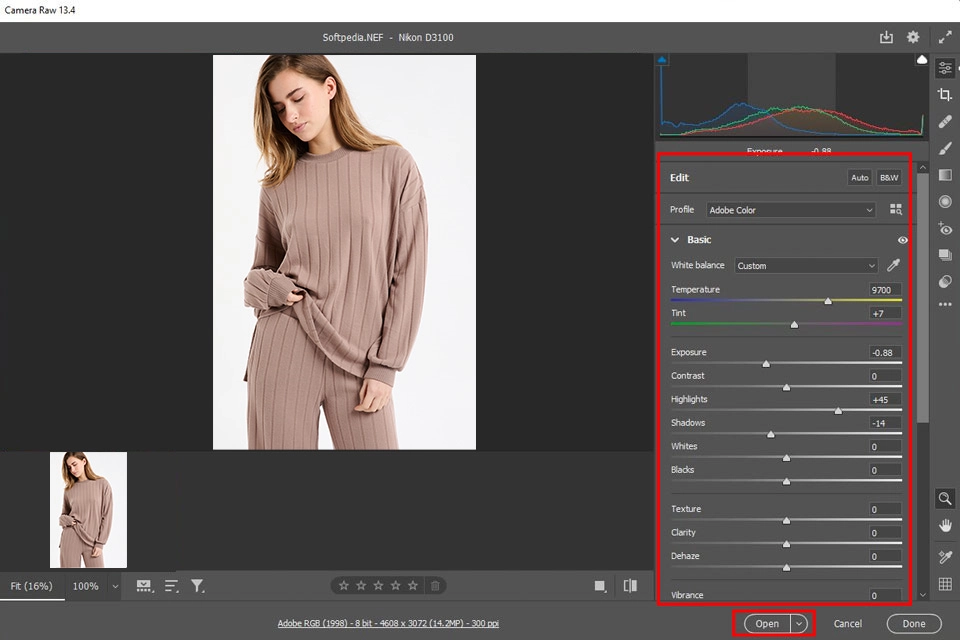
Open Adobe Photoshop. Click File → Open, then select your RAW image. The photo will open in Camera Raw. On the right panel, adjust Exposure, White Balance, Highlights, and Shadows until the image looks balanced. Click Open to bring the image into Photoshop.
Step 2: Eliminate Imperfections for Clear Images
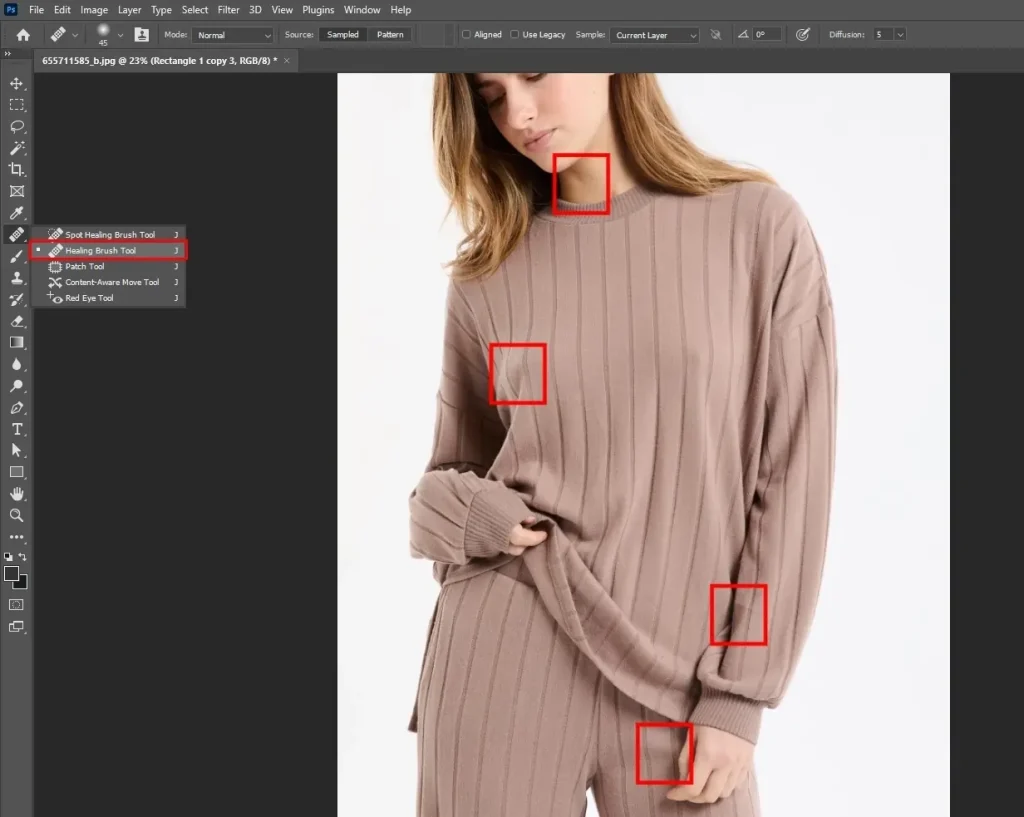
Select the Spot Healing Brush Tool from the left toolbar. Zoom in using Ctrl + (+) (Windows) or Cmd + (+) (Mac). Click on dust, scratches, lint, or small blemishes to remove them. Switch to the Clone Stamp Tool for areas where automatic healing doesn’t look natural.
Step 3: Apply Retouching to Models
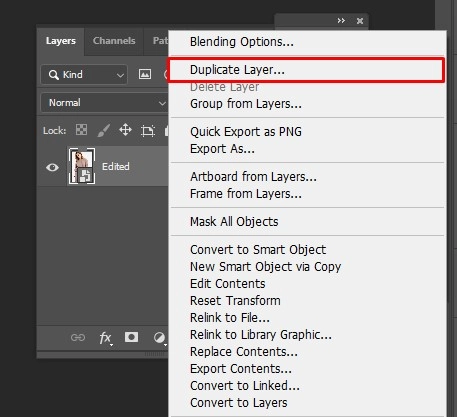
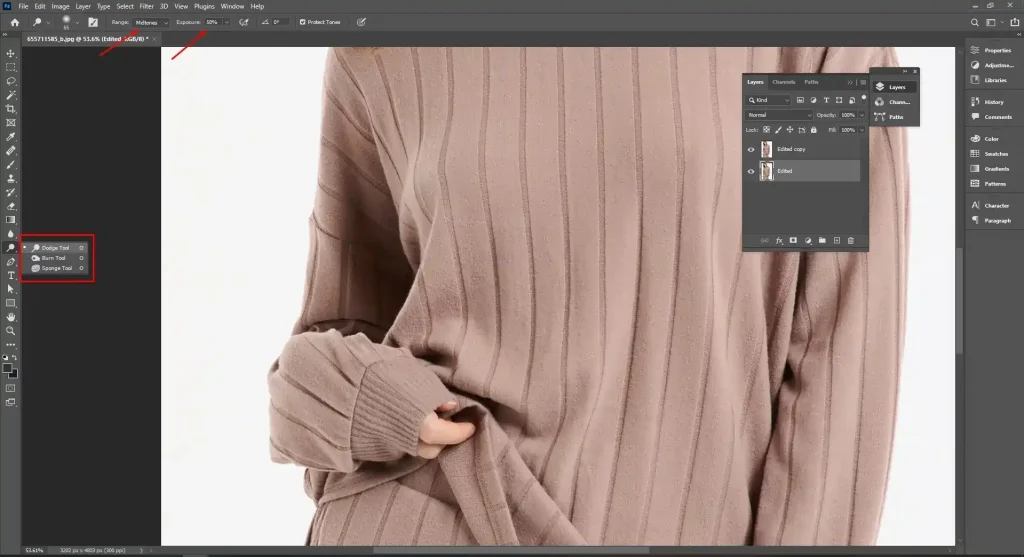
Duplicate the layer by right-clicking and then Duplicate Layer. Use Dodge & Burn (Brush Tool + low opacity) to brighten dark areas and soften shadows. Apply Frequency Separation to even skin tone while keeping natural texture for advanced smoothing. Avoid over-smoothing.
Step 4: Refine the Foreground and the Background
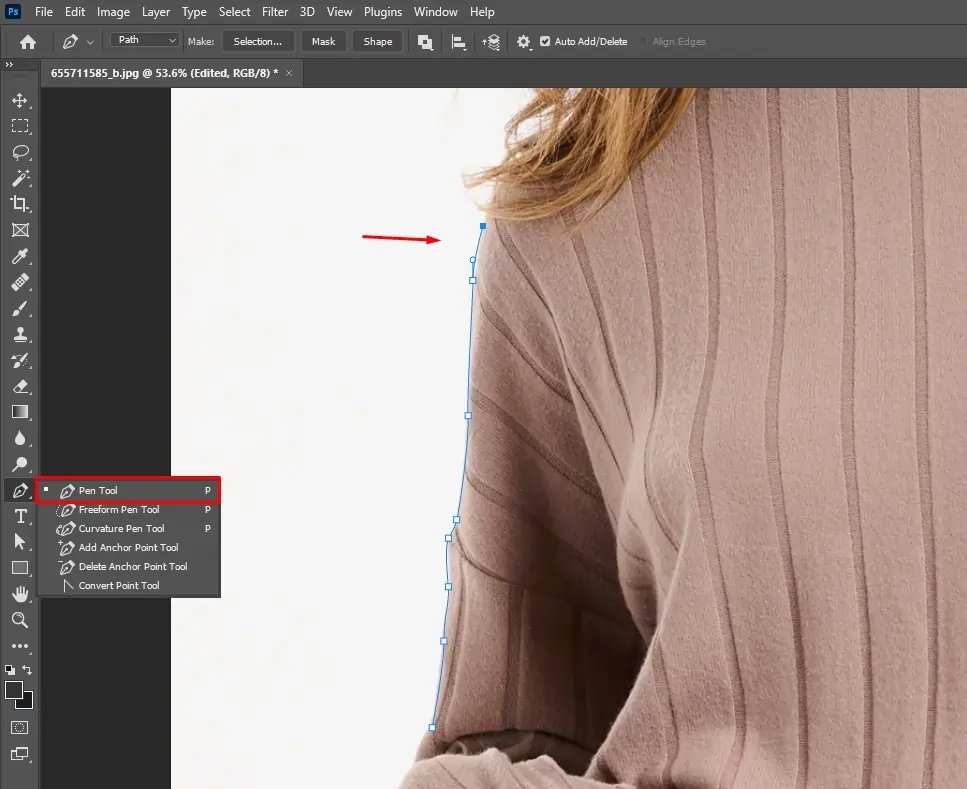
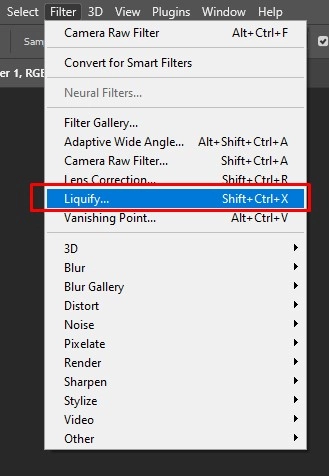
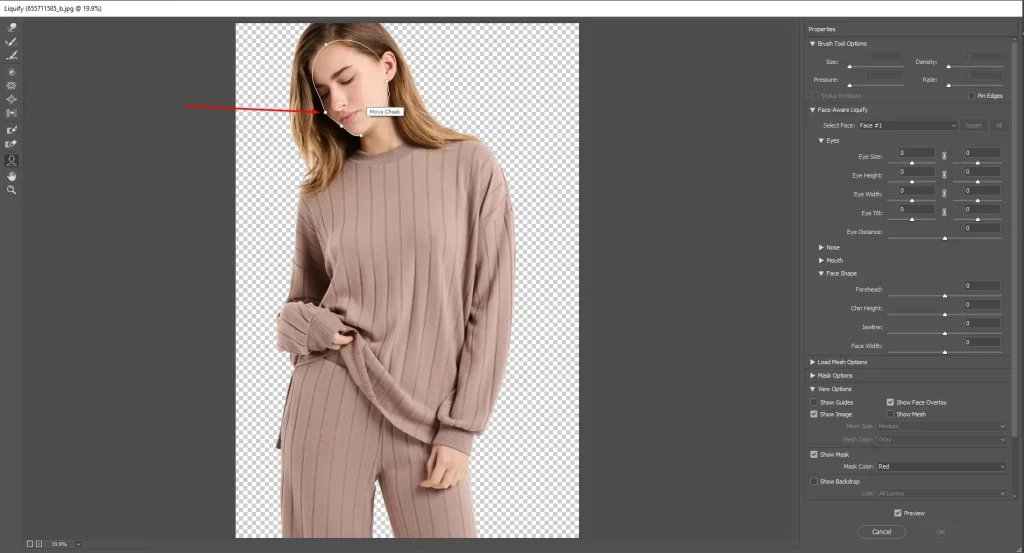
Select the Lasso Tool or Pen Tool to isolate the subject from the image. Use the Liquify tool to fix wrinkles or shape issues. Enhance fabric texture using Dodge & Burn or High Pass. Clean or replace the background using Layer Masks and Clipping Paths.
Step 5: Finalize and Export
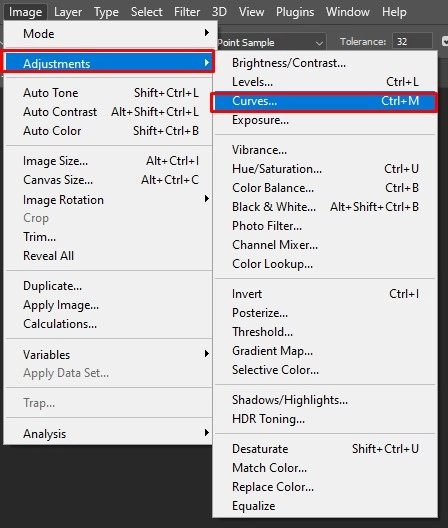
- Go to Image
- Adjustments
- Curves or Selective Color to create a rich, luxury tone
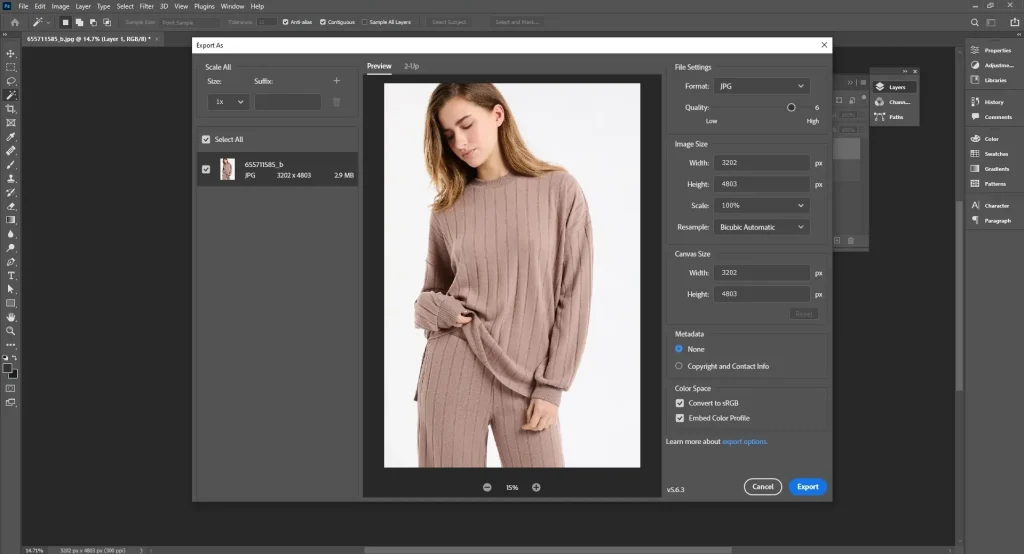
Adjust colors to match the brand style. Then sharpen your image and zoom in for review details. If everything looks fine, export and save as JPEG.
How Do You Find the Best Fashion Photo Editor?
To find the best fashion photo editor, define your needs, calculate image volume and deadlines, analyze the portfolio, check reviews, understand pricing models, and communicate directly.
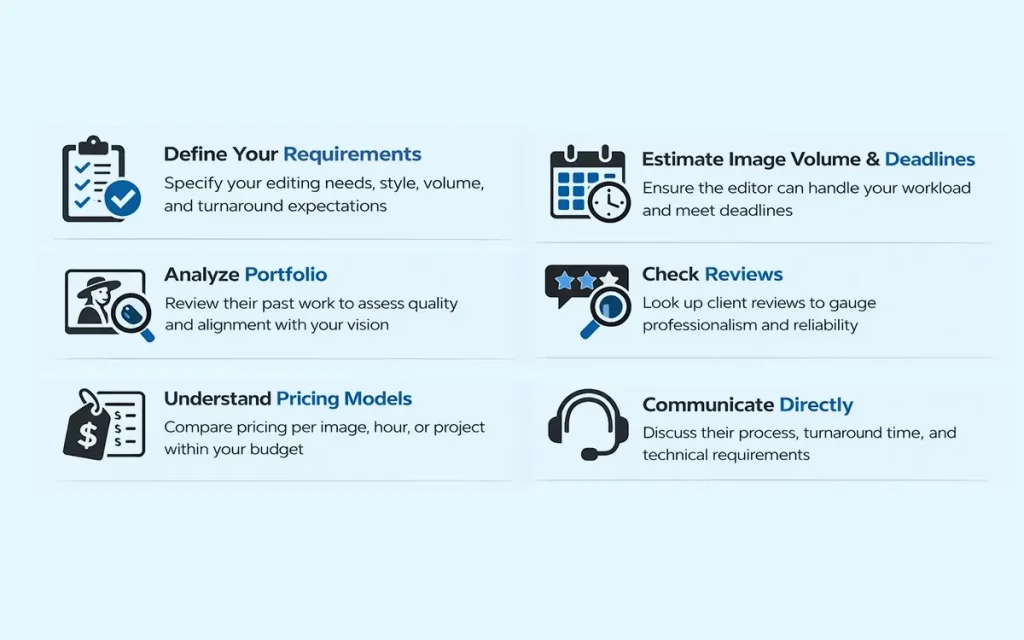
- Define your requirements: Clarify your image editing requirements to decide what type of editor will suit your needs, plus style, volume, and turnaround expectations.
- Estimate image volume and deadlines: Search the company website to find whether they can handle peak seasons and deliver within industry-standard timelines.
- Analyze portfolio: Learn about their work style, service categories through the portfolio or gallery section. You will understand how much their work aligns with your requirements. Do a ‘free-trial’ test to understand their work quality firsthand.
- Check reviews: Search Google, a Trustpilot-like platform for client reviews to learn about their professionalism, work, and service quality. Client data will reveal more truth than you are looking for.
- Understand pricing models: Check their pricing categories, for per image, per hour, per project, and change of price for advanced and customized works. Choose what fits your workflow and budget.
- Communicate directly: Talk to them directly to understand their reliability, working process, used software, offers, turnaround, and clear instructions. Set technical requirements for final delivery as well.
Where to Get the Outsource Fashion Photo Editing Services Near Me?
To get the outsourcing fashion photo editing service near you, search on Google, and check Google/Trustpilot Reviews. Make location specific searches to find the best platform. You can ask for a recommendation on the relevant community or crowdsourcing platforms such as Reddit or Quora.
FAQ’s About Fashion Image Editing
What is color grading in fashion photo editing?
Color grading is a special coloring technique that photo editors apply after color correction. In this process, they adjust tones, hues, contrast, etc to create a consistent visual style. Grading brings a realistic appearance while improving overall image quality to match the brand’s requirements, campaign theme, or seasonal demands.
Should fashion brands outsource photo editing services?
Yes, fashion brands should outsource photo editing services to maintain high-quality, consistent, and updated images processed by skilled editors. Also, outsourcing helps fashion brands maintain their regular business work and sales while the post-production is taken care of by professionals at an affordable cost.
Can AI tools be used in fashion photo editing?
AI tools can be used in fashion photo retouching to perform simple and repetitive tasks, but not for complicated, professional, and on-brand visual creation. High-quality images require precision and situation-based judgment, which AI lacks. This is where human editors’ observation and intervention bring effective solutions to image editing.
How much does fashion photo editing cost?
Fashion photo editing costs start at $0.29 at Offshore Clipping and vary depending on retouching complexity, image volume, turnaround time, and quality standards. High-end e-commerce photos or campaign retouching cost higher due to advanced detailing and creative work.