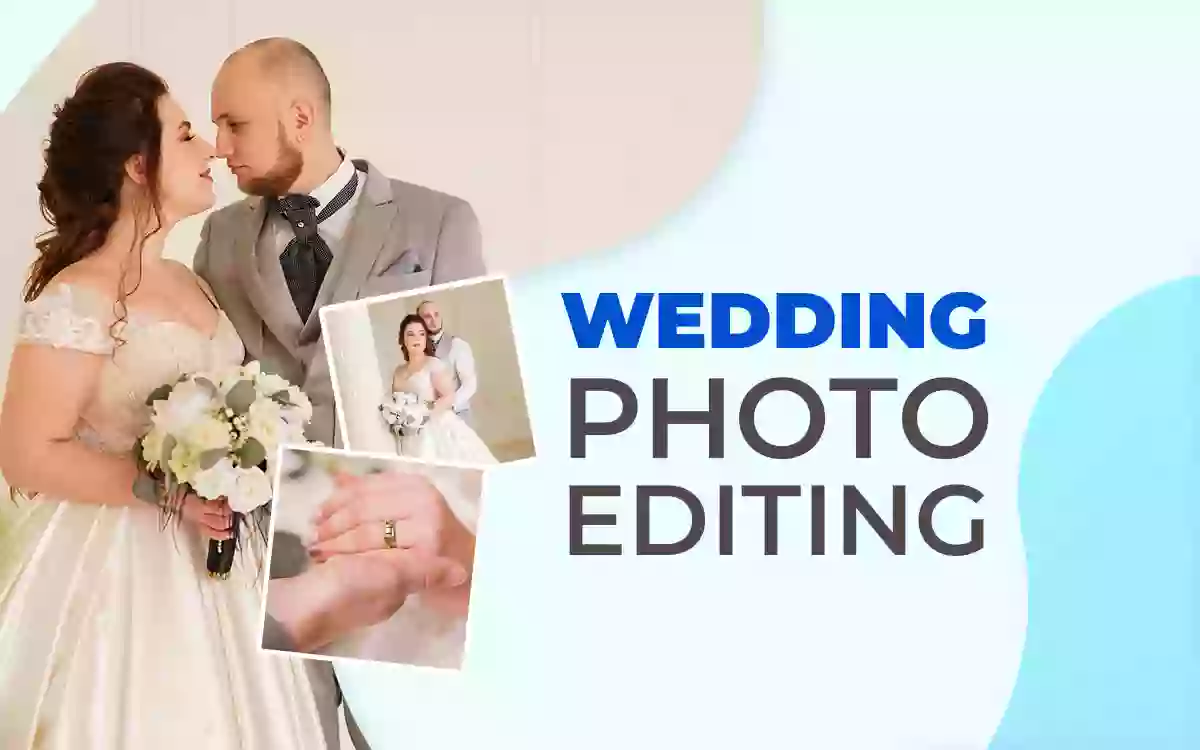
Wedding photo editing refers to post-production work performed on images of the marriage ceremony to improve the look and quality for long-term cherish. Wedding photo editing is important for brides and grooms to preserve emotional value, for photographers to demonstrate skill, for studios and agencies to ensure quality for industry reputation, and for businesses to grow.
Professional wedding image editing services include editing, retouching, masking, and color correction, among others. Photographers mostly hire editors to ensure consistent images. They use Photoshop or Lightroom to edit themselves. While editing, common mistakes like doll-like skin appearance or inconsistent color tones may appear, but are correctable. Professional wedding photo editing costs range between $0.60 to $25 per image.
What you’ll learn in this article
- 1 What is Wedding Photo Editing?
- 2 Why is Wedding Photo Editing Important?
- 3 What Services Are Included in Wedding Photo Editing?
- 4 How Do You Edit a Wedding Photo in Photoshop?
- 5 What Are the Common Mistakes in Wedding Photo Editing?
- 6 What Do Wedding Photographers Use to Edit Photos?
- 7 FAQ’s
- 7.1 What can ruin a wedding photo?
- 7.2 What is the best app to edit wedding photos?
- 7.3 What is the difference between wedding photo editing and wedding photo retouching?
- 7.4 Can wedding photo editing fix lighting and color issues?
- 7.5 Can wedding photo editing remove unwanted objects or people?
- 7.6 Is AI used in modern wedding photo editing?
What is Wedding Photo Editing?
Wedding photo editing is the technical process of enhancing, correcting, stylizing, and refining wedding images to create timeless, memorable, and emotionally rich photographs to match the story, mood, and album-ready output. Photo editors use various advanced color tweaks and filters to transform raw photos into consistent and storytelling visuals.
Editing wedding images includes various techniques to enhance appearance and create emotional attachment as follows
- Correcting lighting inconsistencies from different environments, such as indoor, outdoor, and low-light situations.
- Enhancing brides, grooms, and family members’ facial features and skin tones, while keeping them natural.
- Preserving details in bridal gowns, jewelry, décor, and venue textures.
- Creating a cohesive, authentic, and professional visual style throughout the batch of photos.
Why is Wedding Photo Editing Important?
Wedding photo editing is important to preserve and hold those memories of a person’s big day through visual consistency and professional quality. Image editors perform advanced and creative editing to ensure delicate processing that maintains the emotional impact on the images. By editing images of a marriage ceremony, editors enhance their portfolio, build client trust, and gain long-term referrals. Other perspectives of why wedding image processing is important are as follows.
Do Potential Brides and Grooms Benefit from Edited Wedding Photos?
Yes, the potential brides and grooms benefit from edited wedding photos as they can preserve the emotional value and long-lasting memories. This is a big day for any couple, and the right exposure helps them remember the day even after years pass, use it as an heirloom for the next generation, and save it as a printed album or wall art.
Professionally editing makes the following impact on the wedding pictures
- Creates the best look while maintaining naturalness and authenticity
- Ensures skin tones are flattering and consistent
- Remove visual distractions that break emotional focus
- Produces a cohesive story, not disjointed snapshots
Does a Wedding Photographer Get an Advantage from Having Clients Photos Edited?
Yes, a wedding photographer gets an advantage from having clients’ photos edited because it demonstrates and proves their skill and expertise with attention to detail. As this is a professional responsibility, wedding photographers have to work under rapid light changes, multiple shooting environments, timing pressure, and high expectations from the clients. To ensure the images look high-quality and capture the right emotion, editing is essential.
Professional editing brings the following advantages to a photographer’s work
- Aligns well with the photographer’s signature style
- Ensures consistency across thousands of images
- Maintains quality even inside the shooting challenges
- Protects a photographer’s reputation, review, and referral pipeline and market position
- Saves 40+ hours per week, and prevents burnout during peak season
Do Wedding Photography Studios/Agencies Benefit from Professional Editing?
Yes, wedding photography studios or agencies benefit from professional editing as they hold onto their reputation and eliminate risks like inconsistent galleries, client dissatisfaction, or brand dilution. Challenges a photography studio or agency faces are far different from those of individual photographers, which include managing multiple photographers, different camera systems, maintaining variety in editing styles, and high-volume demand, etc. They need to streamline the workflow with professional output.
Outsourcing photo editing helps a wedding photography agency or studio in the following ways
- Standardizes photo output across teams
- Ensures predictable and consistent quality for clients
- Maintains a unified brand look, even though the projects are different
- Supports the business’s scalable growth and project volumes all year round
Does Wedding Photo Processing Matter from a Business Perspective?
Yes, wedding photo processing matters from a business standpoint because it directly benefits business growth, profitability, and long-term viability. Professionally edited images increase viewers’ perspective, support upsells, improve client satisfaction and referrals, improve client reviews, which impacts the business discoverability on Google search, and it justifies the premium pricing.
Expertly edited photos help businesses in the following ways
- Ensure faster turnaround and happy clients
- Improves operational efficiency
- Produces marketing assets and strengthens portfolios
- Acts as social proof on the website and social platforms
What Services Are Included in Wedding Photo Editing?
Services included in wedding photo editing are photo editing, photo retouching, image masking, color correction, image manipulation, image restoration, drop shadow, and Photoshop editing. These services ensure wedding pictures look refined, polished, consistent, and emotionally accurate by correcting light, color, details, and distractions. It results in album-ready and portfolio-ready images.
8 Editing services applied to wedding photos are as follows.
1. Photo Editing Service
Photo editing is the foundational work that enhances image exposure, appearance, color balance, sharpness, and consistency to create appealing images, preserving natural moments and maintaining photographers’ original style. Editing makes overall adjustments to photos and ensures visual consistency in different scenes and lighting conditions.
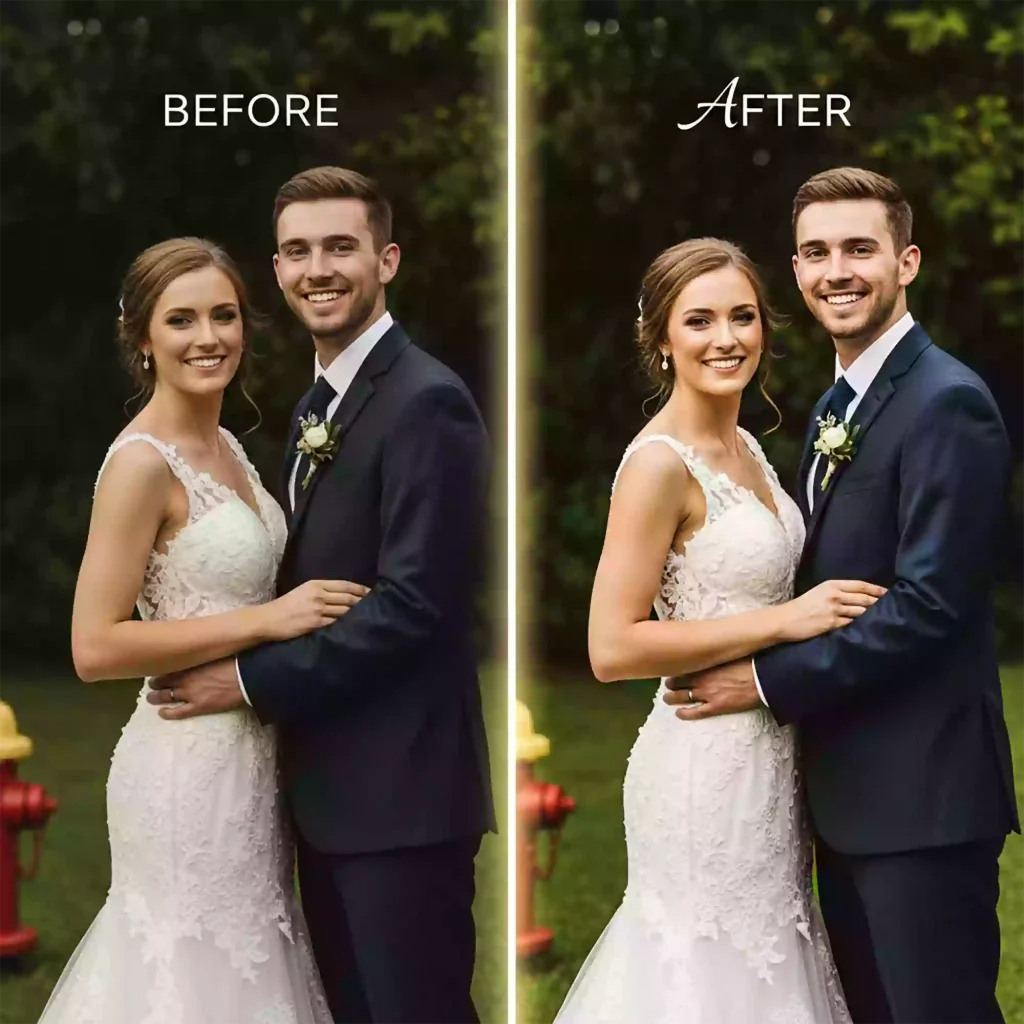
Wedding photo editing involves the following techniques
- White balance correction
- Cropping and straightening
- Batch editing for consistency
- Exposure and contrast balancing
- Highlight and shadow recovery
2. Photo Retouching Service
Photo retouching focuses on detailed and selective improvements to make the subject appear authentic and glamorous. It is commonly applied to subject-specific refining, couple portraits, close-ups, and hero images intended for albums or prints.
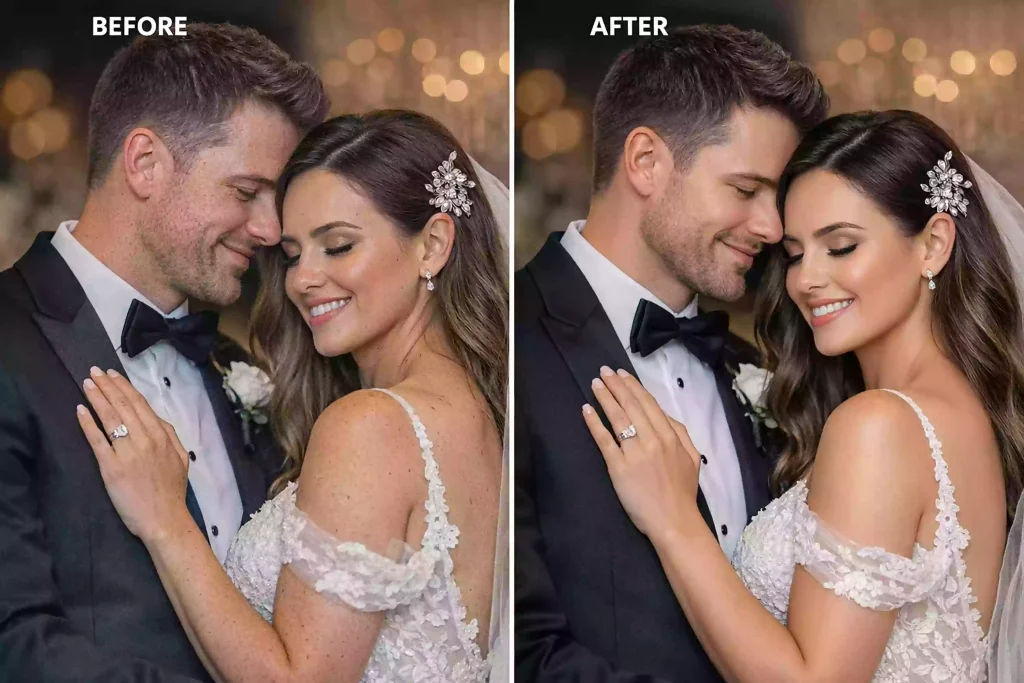
Wedding image retouching involves the following techniques
- Skin smoothing and blemish removal
- Dodge and burn for facial shaping
- Eye, teeth, hair, and fabric retouching
- Frequency separation (High-End Work)
3. Image Masking Service
Image masking is the technique to separate subjects or complex edges, such as veils, hair, or dresses. The technique ensures precise background control, replacement, or enhancement without damaging fine details.
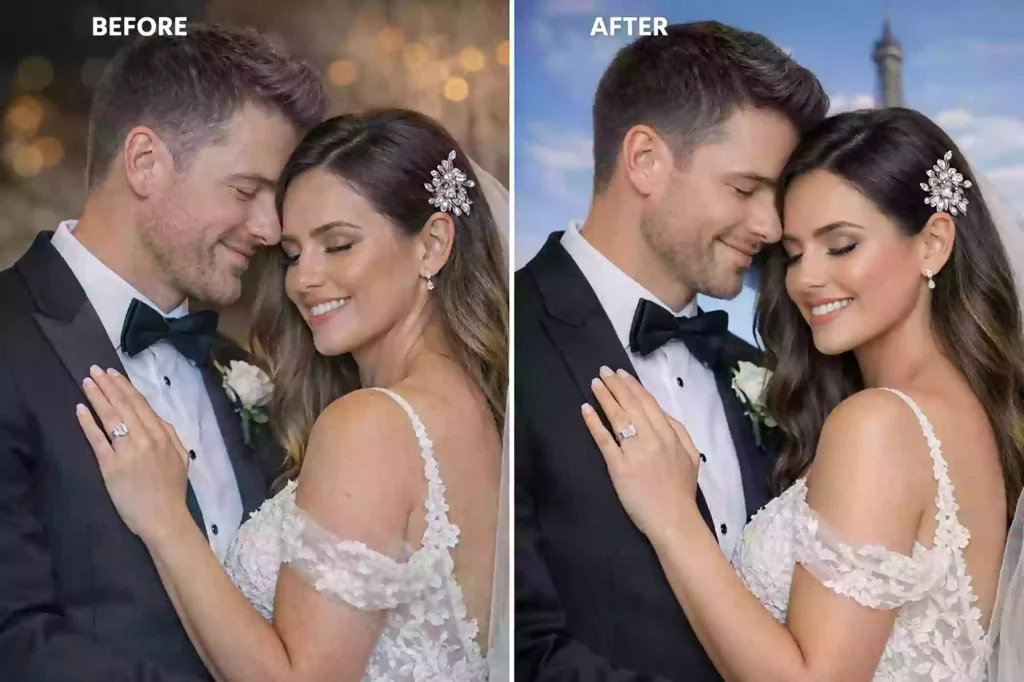
Wedding photo masking involves the following techniques
- Hair and fur masking
- Layer masking in Photoshop
- Channel-based selections
- Background cleanup or replacement
4. Color Correction Service
Color correction is the process of tones and hues in images for accurate skin colors, balanced lighting, and visual harmony. Images captured under mixed or challenging lighting environments have inconsistent color appearance and color casts.
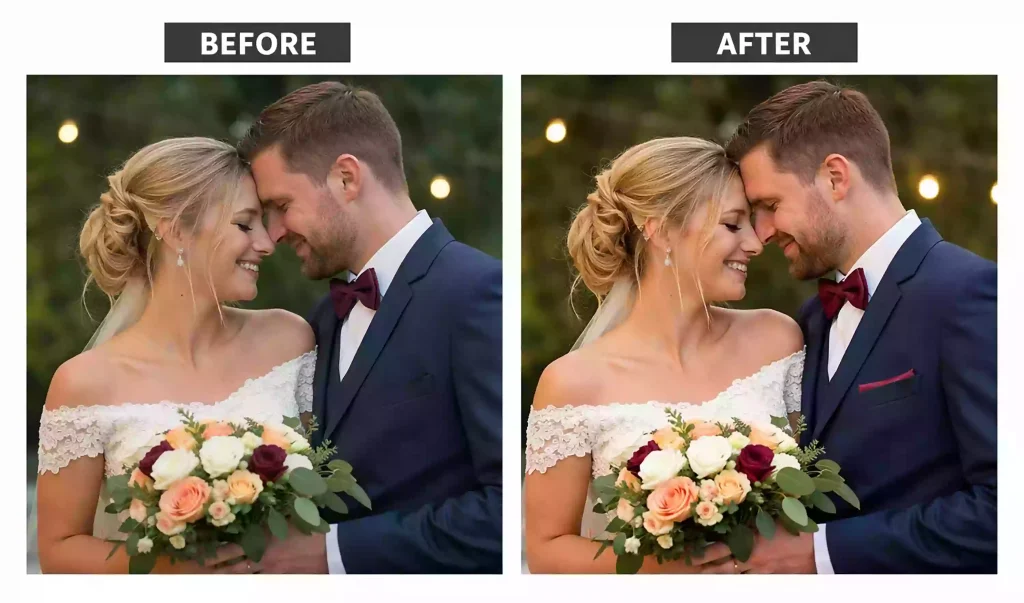
Wedding photo color correction involves the following techniques
- Skin tone matching
- Color cast removal
- White balance, contrast, and saturation adjustment
- LUT-based adjustments (When Required)
5. Image Manipulation Service
Image manipulation involves creative alterations that aren’t inside the original image.
Editors perform different works beyond standard editing and composition to create visually refined wedding images. It makes structural changes in images and produces creative enhancements.
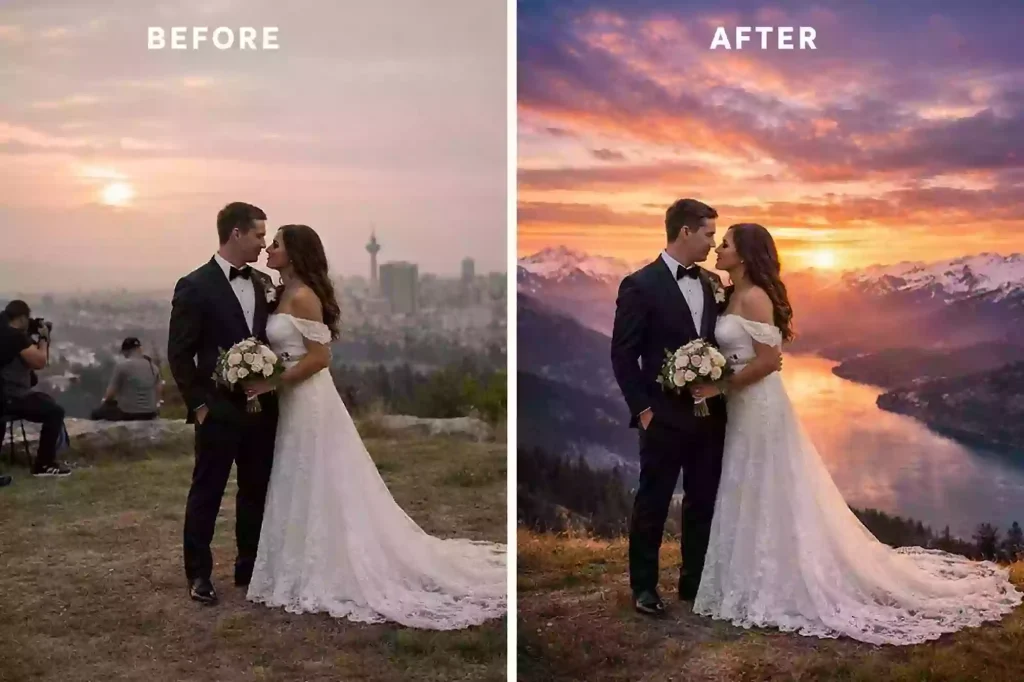
Wedding photo manipulation involves the following techniques
- Object and people removal
- Background replacement
- Composite image creation
- Sky replacement and perspective correction
6. Image Restoration Service
Image restoration is applied to wedding photos that are old, damaged, or low-quality. This service brings clarity, color, and recovers lost details caused by fading, scratches, noise, or resolution loss
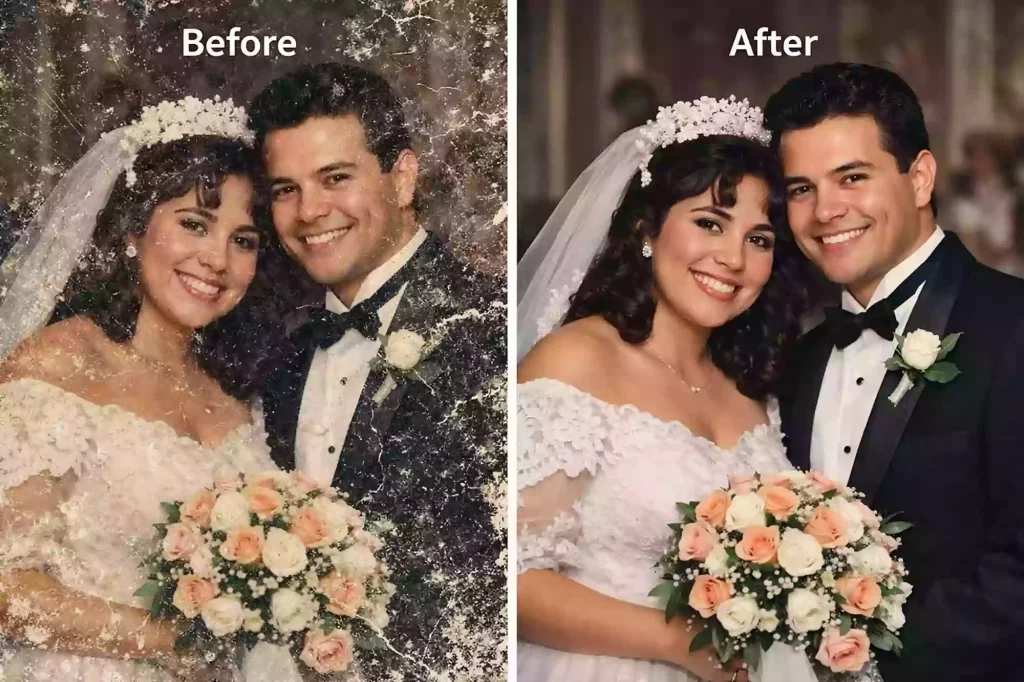
Wedding photo restoration involves the following techniques
- Noise, scratch, and dust removal
- Color fading correction
- Detail reconstruction
- Resolution enhancement
7. Drop Shadow Service
Drop shadow is the process of adding a realistic shadow to images, as per the subject. It enhances depth and subject grounding, displays elements naturally, and improves visual realism for albums, collages, or marketing materials.
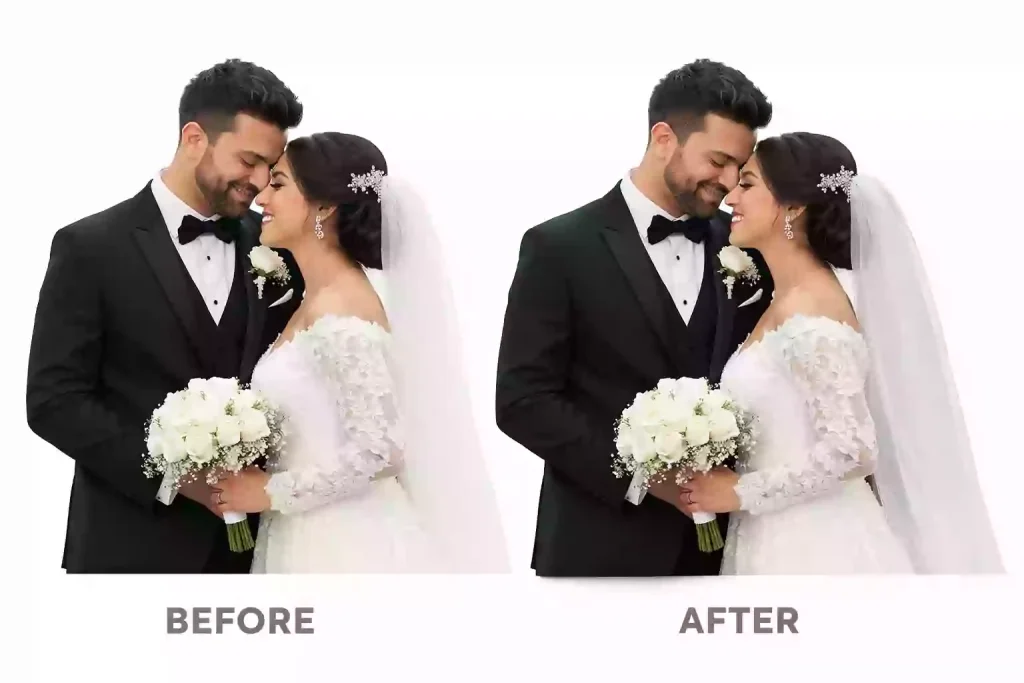
Wedding photo drop shadow involves the following techniques
- Natural shadow creation
- Angle and opacity control
- Light-source matching
- Soft and contact shadow application
8. Photoshop Editing Service
Photoshop services cover various advanced, custom-request enhancements for wedding photography clients. In this service, photo editors apply complex edits that go beyond traditional workflows and require expert manual control, and produce highly precise results.
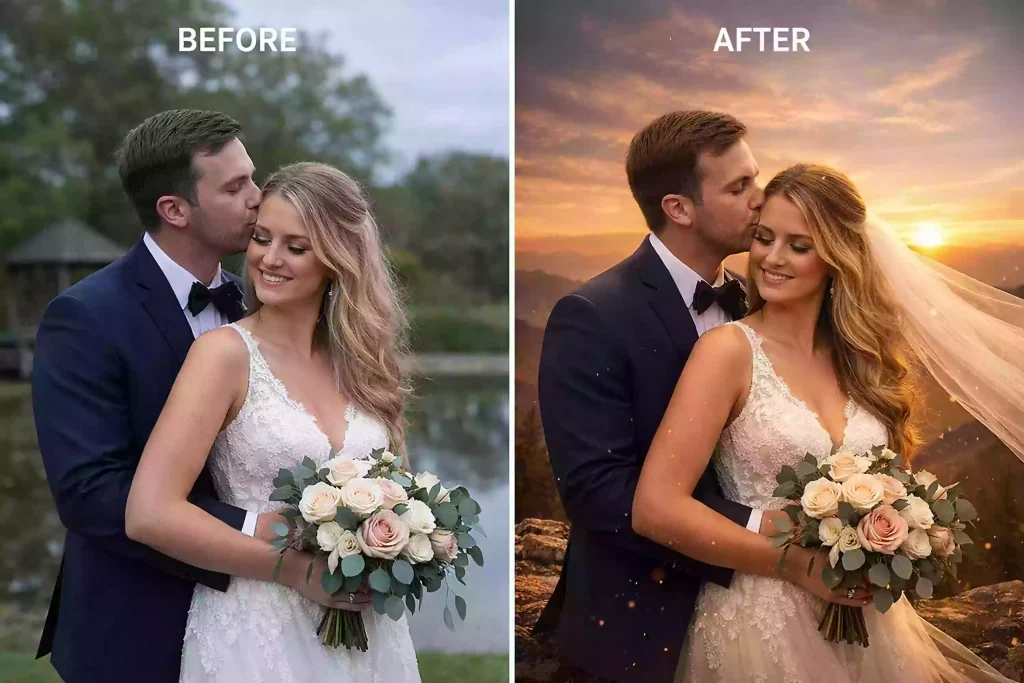
Photoshop editing for wedding photography involves the following techniques
- Layer-based editing
- Advanced masking and blending
- Retouching and manipulation
- Color grading and compositing
- Non-destructive workflows
How Do You Edit a Wedding Photo in Photoshop?
Here Is the step-by-step tutorial to edit a wedding photo in photoshop
- Open Photoshop and duplicate the layer
- Fix the white balance and exposure of the image
- Enhance images tone, contrast, and mood
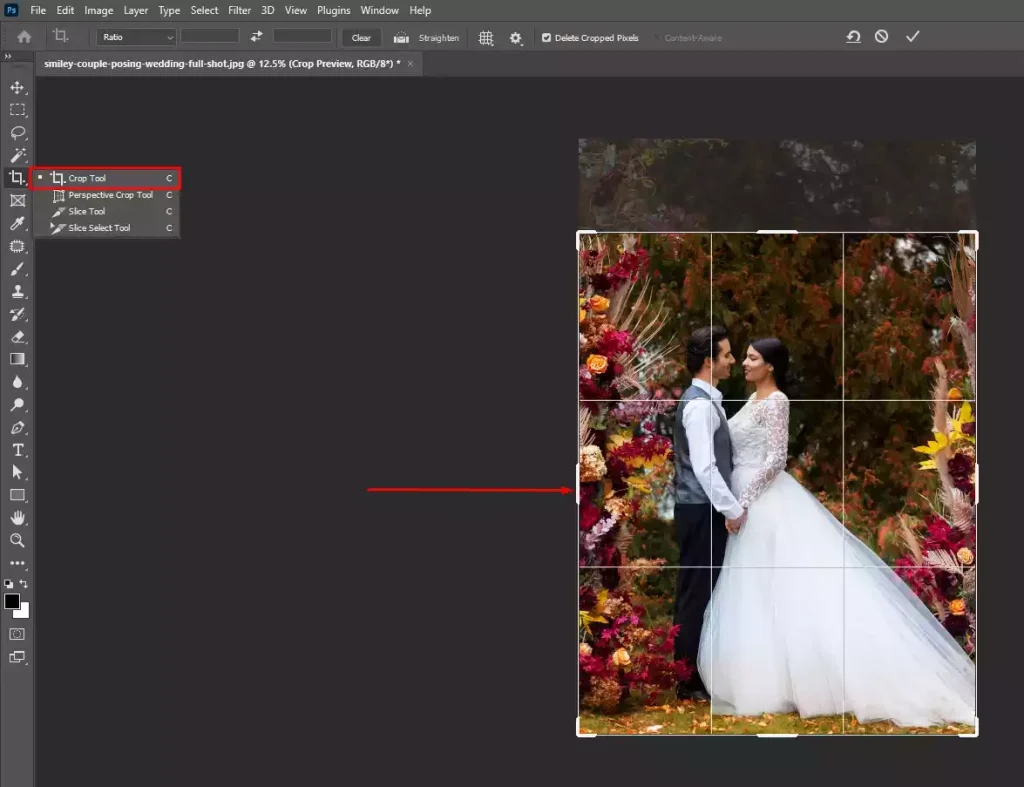
- Crop and straighten the image
- Retouch and smooth the skin of the people
- Sharpen the image and export
Step 1: Open Photoshop and Duplicate the Layer
To open photoshop, follow these steps
- Go to File and then Open
- Select the image
- Duplicate the background layer (Ctrl/Cmd + J)
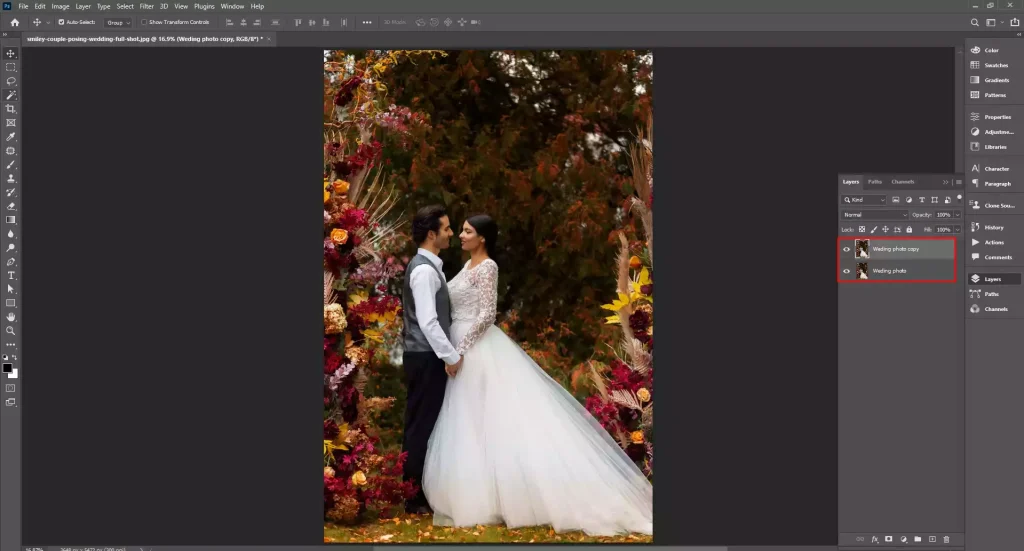
Upon creating a duplicate layer, you enable non-destructive editing without permanently damaging the image.
Step 2: Fix the White Balance and Exposure of the Image
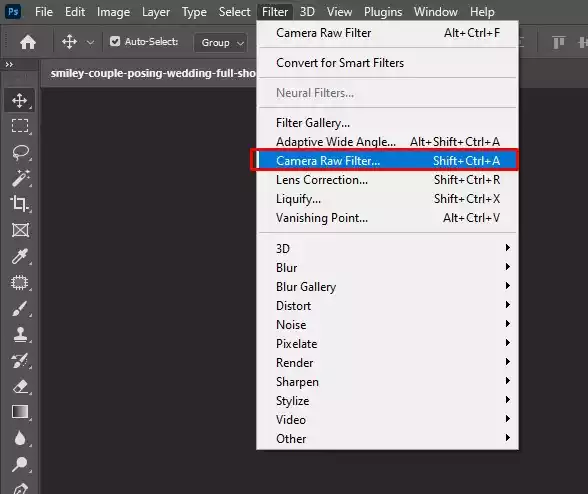
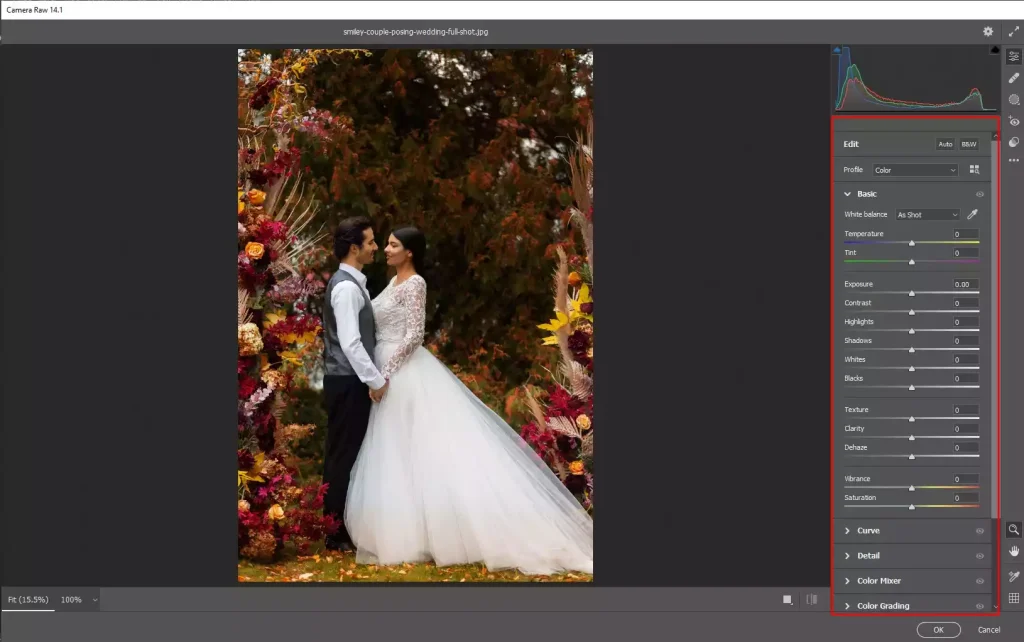
Adjust the exposure and white balance to remove color casts, balance lighting, and ensure details are restored throughout the image for that
- Go to Filter > Camera Raw Filter
- Select the White Balance Eyedropper (I)
- Click on a neutral area, such as a white dress or shirt
- Adjust exposure, highlights, shadows, whites, and blacks
Step 3: Enhance the Image’s Tone, Contrast, and Mood
Go to Camera Raw and adjust contrast, texture, and clarity. Avoid high clarity on faces for soft skin and fine-tune the vibrance. These will create a refined look, add depth and richness to the images while maintaining a romantic and jovial mood.
Step 4: Crop and Straighten the Image
Select the Crop Tool and straighten horizons or vertical lines. Crop the image to center attention on the couple. It will create a visual balance of images
Step 5: Retouch and Smooth the Skin of the People
Photo retouching ensures the removal of imperfections, distractions, and preservation of natural skin texture without overediting
To retouch wedding images, follow these steps
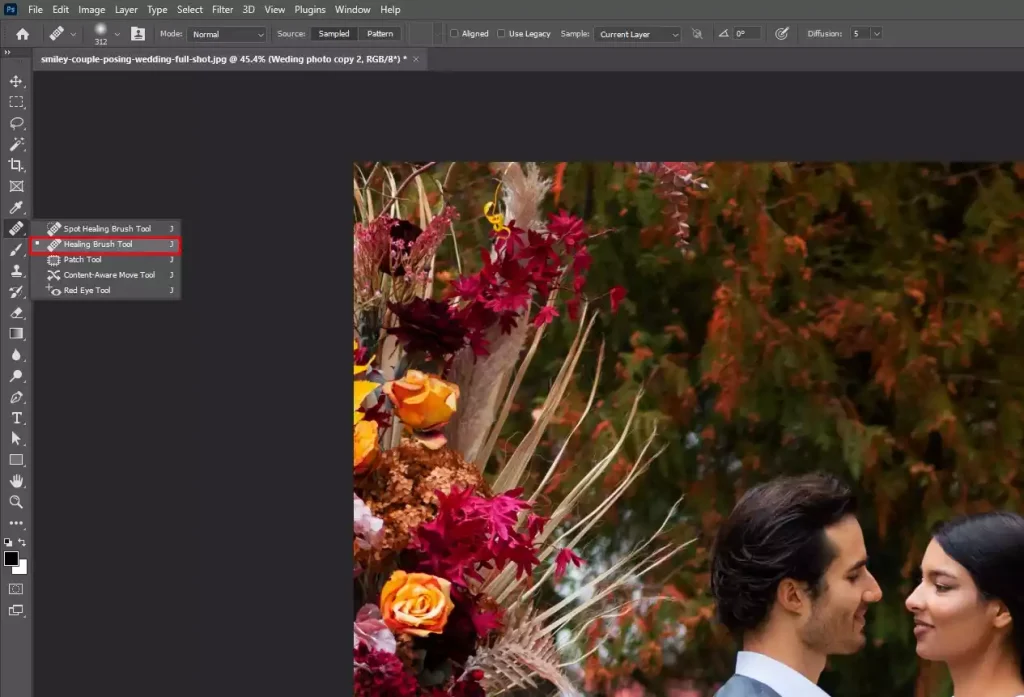
- Use the Spot Healing Brush (J) to remove blemishes
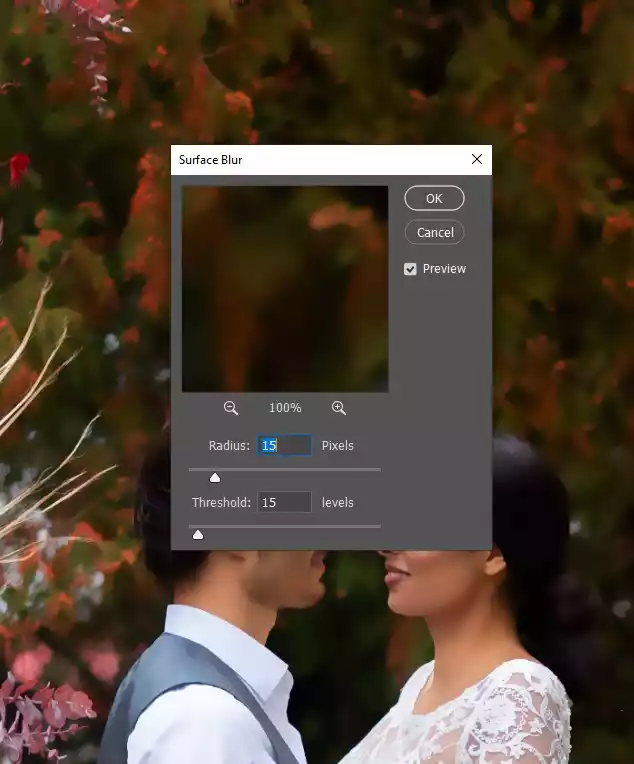
- Duplicate the layer again and apply Surface Blur lightly
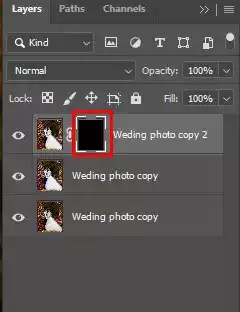
- Add a black layer mask and paint white only on skin areas
Enhance facial features and clean the background. Remove distractions and details, and create a 50% gray layer in Overlay mode. Use the Dodge and Burn tools to enhance the facial depth. Use Clone Stamp or Content-Aware Fill to remove background clutter. And then, apply subtle Color Balance or Selective Color adjustments. This will sharpen focus and ensure consistency in color styling.
Step 6: Sharpen the Image and Export
To finalize the image, first merge visible layers
- Go to Filter > Sharpen > Smart Sharpen and apply mild sharpening
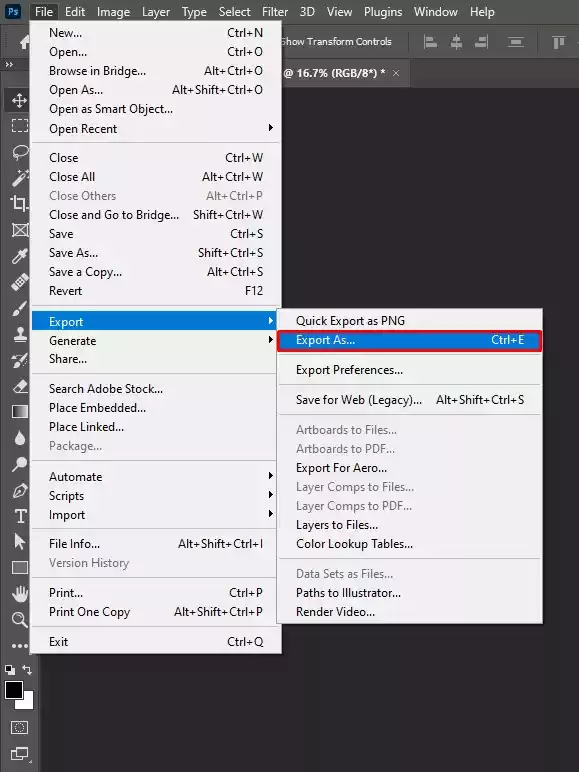
- Then, go to the file again and click Save As
- Export as JPEG (sRGB) for web or TIFF for print
What Are the Common Mistakes in Wedding Photo Editing?
The common mistakes in wedding photo editing include these 7: doll-like skin appearance, inconsistent color tones, incorrect white balance, blown highlights on bridal dresses, unnatural background blur, preset-based workflow, and missed background distractions. These problems are subtle and easy to miss, but careful observation and mastery of tools will help you achieve the right results.
The 7 common problems in wedding photo editing are listed in detail, and the solutions are listed as follows
1. Doll-Like Skin Appearance
Excessive editing makes skin appear fake, plastic, and unnatural.
Solution: Use tools like frequency separation, dodge & burn, and low-opacity brushes edit skin with realism.
2. Inconsistent Color Tones
Capturing shots in different lighting conditions results in an imbalance and a mismatch of colors in images.
Solution: Synchronize base edits, adjust exposure, and color temperature per lighting scenario for a cohesive look.
3. Incorrect White Balance
Shooting images in mixed lighting (daylight, tungsten, LED) causes yellow or blue color casts.
Solution: Set white balance individually for each scene.
4. Blown Highlights on Bridal Dresses
Bridal gowns may lose detail, look pure white, and have no fabric texture.
Solution: Use localized adjustments to retain dress detail without dulling the image.
5. Unnatural Background Blur
Artificial blur makes subjects detached from the scene.
Solution: Use precise masking and feathered edges for natural depth separation.
6. Preset-Based Workflow
Arbitrary use of presets harms images under varied lighting and scene conditions.
Solution: Use presets as a starting point, but stick to manually refining the key details to control and precise output.
7. Missed Background Distractions
Tiny and unnoticed elements, such as exit signs, clutter, or random people passing by, distract viewers from intended emotions.
Solution: While reviewing, zoom in and remove them using content-aware tools and cloning techniques.
What Do Wedding Photographers Use to Edit Photos?
Wedding photographers take 2 measures to edit photos: they edit themselves, and they outsource. They use professional software such as Adobe Photoshop or Adobe Lightroom to edit the wedding pictures when time allows. However, most photographers outsource to a photo editing agency to access industry expertise and professional output.
Wedding Photographers Use External Photo Editors for The Following Reasons
- To ensure high-quality and consistent images
- To deliver images on time and save costs
- To reduce burnout caused by overworking
- To regain time for creative photography works
- To create space for building client relationships and business growth
How Do You Choose the Best Wedding Photo Editing Service Provider?
To choose the best wedding photo editing service provider, evaluate the gallery/portfolio for editing style, quality, and consistency, learn about cost and turnaround time, ask about data security, scalability, communication, and revision. This information will help you choose the best editor to edit wedding photographs.
8 Factors will assist you in selecting the most reliable wedding photo editor as follows.
1. Check Free Trial: Always test with real RAW files to confirm their editing style to understand overall image results.
2. Experience & Industry Reputation: Check reviews online to learn about their industry expertise and reputation among long-term clients.
3. Gallery-Level Consistency: Review their portfolios/galleries to ensure uniform color, exposure, and mood across hundreds of images.
4. Human vs. AI Editing Approach: Aim for a human editor for precise and humanized judgment rather than pre-made template-based works.
5. Turnaround Time & Scalability: Verify their regular turnaround, rush options, and peak-season capacity before committing.
6. Editing Scope & Revisions: Confirm their editing level(basic to advanced and custom) and how many free revisions are allowed per edit.
7. Communication & Workflow Fit: Understand their communication; talk directly if needed to learn how client-friendly their onboarding process is.
8. Pricing Transparency: Evaluate cost against quality, consistency, reliability, bulk discount, project support, etc.
How Much Does Professional Wedding Photo Editing Cost?
Professional wedding photo editing costs range between $0.60 to $25 per image, depending on image type, editing level, turnaround, project complexity, project volume, individual or agency, editor’s experience, etc. Pricing also varies by the specific service category people look for.
Pricing for marriage ceremony photography is also estimated in per hour, flat rate, and project basis as follows
| Pricing Model | Cost |
|---|---|
| Per Image | Start around $0.60 |
| Per Hour | Start around $35 |
| Per Project (Flat Fee) | Start around $99 |
| Turnaround-Based | Additional 20% to 50% than the regular |
| Style-Based | Vary based on the client’s preference |
| Revision-Based | Free revision to paid |
How Long Does Wedding Photo Editing Take?
Wedding photo editing takes 1 week to 5 weeks for each client project. Photo culling takes around 4 hours to 2 business days. Basic editing will require 2 to 3 business days. Advanced and custom editing will take 1 week or more time to edit. The timing varies depending on the number of images, the type of editing, the complexity level, turnaround, and revisions.
FAQ’s
What can ruin a wedding photo?
Elements that can ruin a wedding photo include poor lighting, harsh shadows, incorrect white balance, distracting backgrounds, blown highlights on bridal dresses, or inconsistent color tones. The appearance of these problems in images is common but fixable with professional editing.
What is the best app to edit wedding photos?
The best apps to edit wedding photos include Adobe Photoshop for detailed retouching and Lightroom for batch color correction. The use of editing tools varies from user to user. You can use more than one app to ensure precision and high-quality results.
What is the difference between wedding photo editing and wedding photo retouching?
The difference between wedding photo editing and wedding photo retouching is the level of processing; editing focuses on overall adjustments such as exposure, color correction, and consistency across the full gallery. Wedding photo retouching focuses on image enhancement through detailed, localized improvement such as skin refinement, blemish removal, and facial detailing.
Can wedding photo editing fix lighting and color issues?
Yes, wedding photo editing can fix lighting and color issues by adjusting exposure, highlights, shadows, white balance, and contrast. Professional editing balances lighting variations and differences to restore natural skin tones and create a consistent visual mood across all marriage ceremony images.
Can wedding photo editing remove unwanted objects or people?
Yes, wedding photo editing removes unwanted objects or people that use content-aware fill, cloning, and masking techniques. You will be able to eliminate distractions such as exit signs, clutter, or background guests without affecting the authenticity of the moment, and keep the visual focused.
Is AI used in modern wedding photo editing?
Yes, AI is used in modern wedding photo editing, but it has yet to reach the industry-level output. They are great tools for basic editing, culling, batch color correction, and noise reduction. However, professional editing performed by photo editors ensures precision, relies on creative decisions and emotional accuracy, which AI can decipher.