
A+ Content on Amazon is a feature that lets brand-registered sellers enhance their product detail pages with rich media elements like images, comparison charts, brand storytelling modules, and detailed product descriptions. It replaces the standard plain-text product description section with visually engaging content designed to educate shoppers and improve conversion rates.
If you sell on Amazon and your listings still rely on basic text descriptions, you are leaving conversions on the table. Over 353 million product listings compete on Amazon right now. Shoppers scroll fast, compare often, and buy from listings that answer their questions clearly.
A+ Content gives you the space to do exactly that. It lets you show what your product does, explain who it is for, and build brand trust before the shopper ever reads a single review.
According to Amazon, brands using Basic A+ Content can see sales increase by up to 8%. Well-designed Premium A+ Content can push that number up to 20%. Those numbers only happen when the content itself is well-structured, visually clear, and built around what buyers actually need to know.
This guide covers everything: what A+ Content is, the different types, which content modules drive the most impact, how to create it step by step, image specifications, design best practices, common mistakes, and how to measure results.
Need Professional Amazon A+ Content Visuals? Our Amazon product infographic design team creates high-converting A+ images, comparison charts, and lifestyle graphics for sellers who want listings that stand out. Get started with Offshore Clipping today.
What Is A+ Content on Amazon?
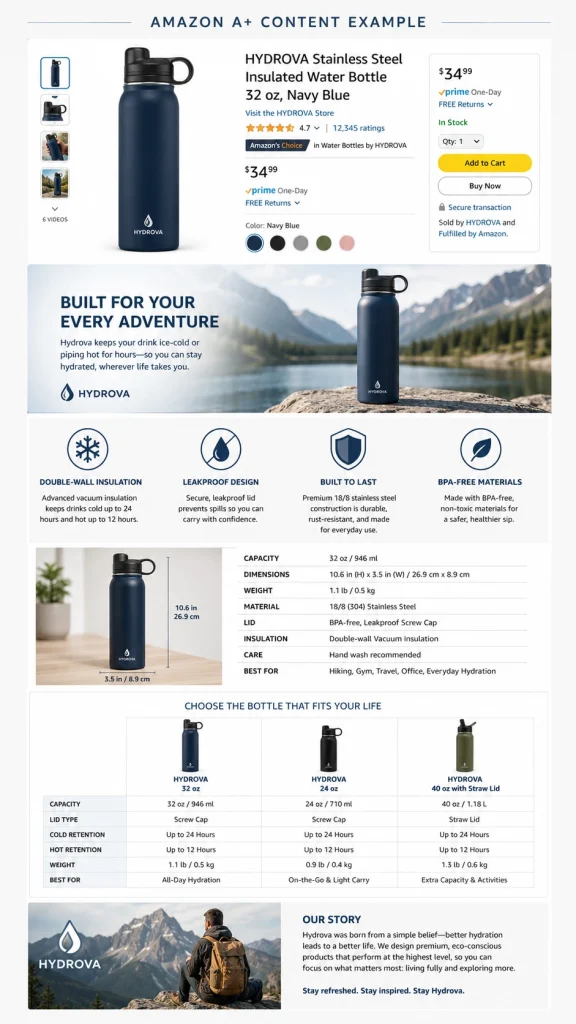
Amazon A+ Content, formerly known as Enhanced Brand Content (EBC) or Amazon Brand Enhanced Content, is a listing feature available to eligible brand owners. It adds a rich content section to the product detail page, appearing below the title, bullet points, and main product images.
Instead of the standard text-only product description, A+ Content lets you use a combination of high-quality photos, lifestyle images, infographic-style feature breakdowns, comparison tables, brand story sections, and structured text placements. The result is a mini landing page within your Amazon listing.
One important distinction: A+ Content does not replace your entire listing. Your title, bullet points, product images, search terms, pricing, and reviews all remain separate. A+ Content specifically enhances the product description section of the detail page and adds brand storytelling below it.
Shoppers typically encounter A+ Content when they scroll past the main image gallery and bullet points. On desktop, it appears in the lower half of the page. On mobile, the content modules stack vertically, which means how your images and text display on smaller screens matters just as much as the desktop layout.
Types of Amazon A+ Content
A+ Content is not a single feature. It includes three distinct content types, each serving a different purpose.
Basic A+ Content
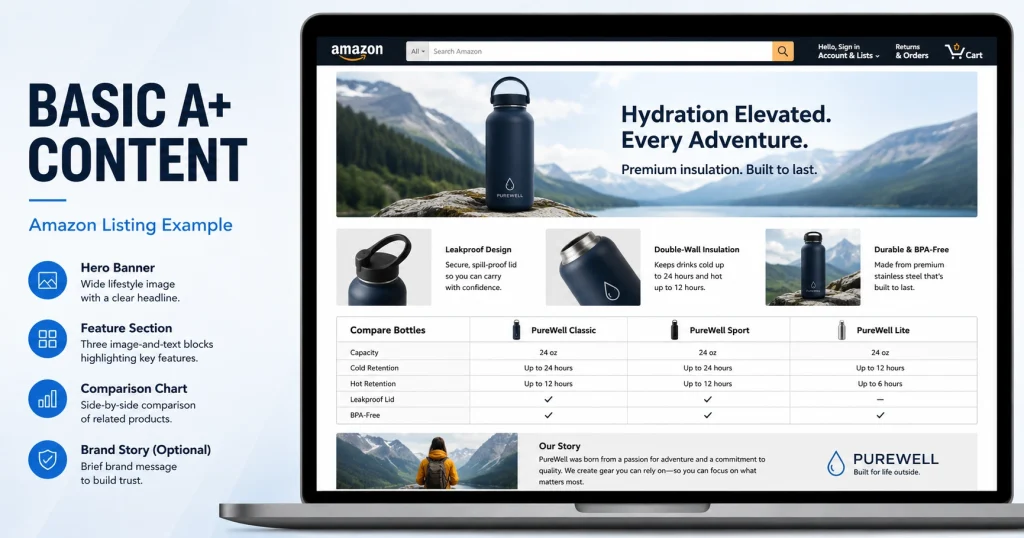
Basic A+ Content is the starting point for most brand-registered sellers. It provides access to a set of standard content modules including image and text combinations, text overlay modules, comparison charts, technical specification tables, and text-only sections.
Basic A+ Content is free for eligible sellers and works well for most product categories. The exact number of modules you can use per ASIN has changed over time as Amazon updates the feature.
Premium A+ Content
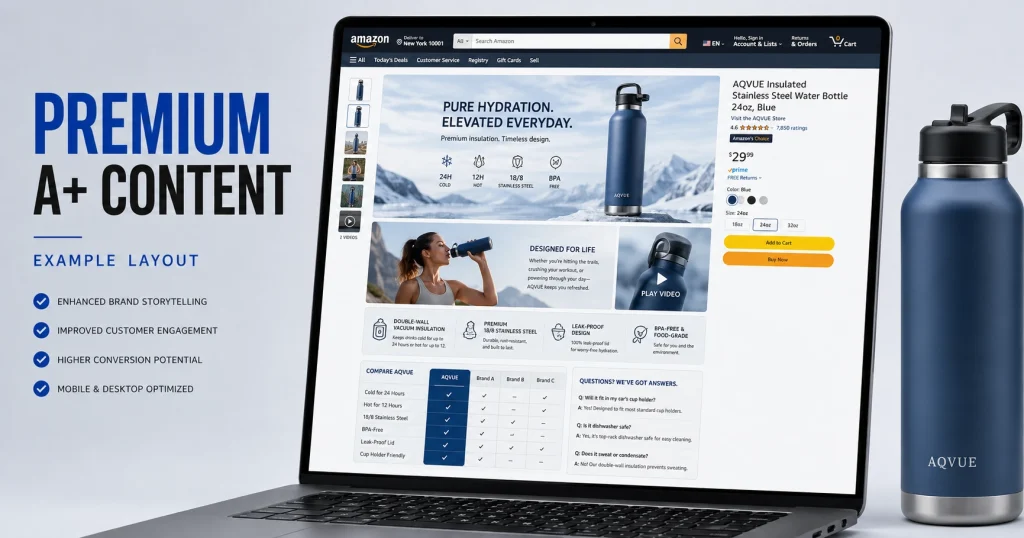
Premium A+ Content offers a richer set of modules compared to Basic. It includes video modules, interactive hotspot modules, clickable carousels and image carousels, video carousels, Q&A modules, enhanced comparison charts, and larger image layouts.
Here, the qualification requirements are separate from Basic A+ eligibility. Amazon has adjusted these requirements over time. As of 2026, check your Seller Central account for current Premium A+ Content eligibility status rather than relying on older documentation.
Premium A+ works especially well for high-traffic products, hero SKUs, technical products that benefit from video demonstrations, and premium-priced items where shoppers need extra confidence before purchasing.
Brand Story
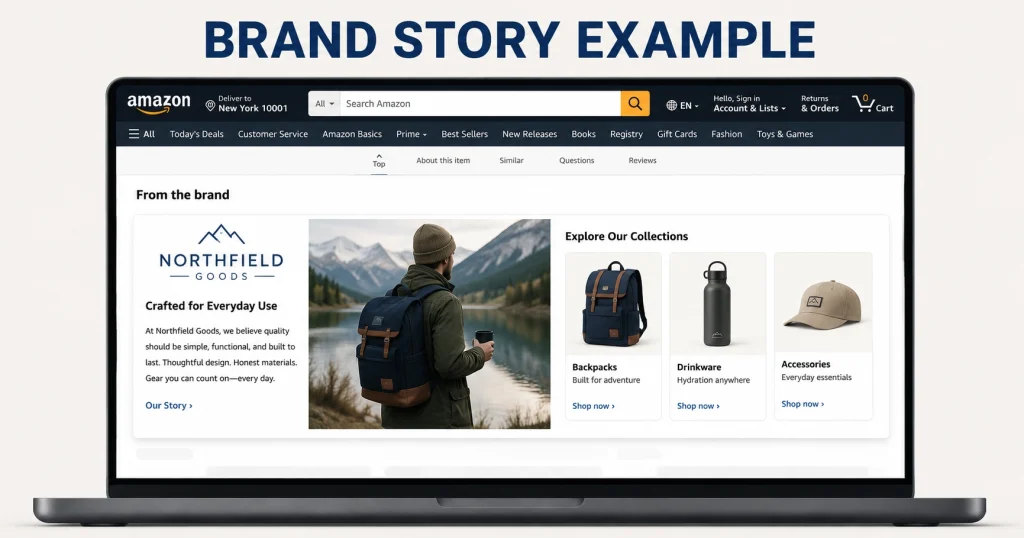
Brand Story is not a tier of A+ Content. It is a separate content type that can appear alongside either Basic or Premium A+ Content on the same listing.
A Brand Story appears in the "From the Brand" section of the product detail page. It communicates your brand's mission, values, history, and product range. You can include a brand logo, background imagery, and links to your Amazon Brand Store and other products in your catalog.
Unlike product-specific A+ Content, your Brand Story can be applied across all your ASINs (Amazon Standard Identification Numbers). This creates a consistent brand presence throughout your catalog and supports cross-selling by helping shoppers discover your other products.
How They Work Together
| Content Type | Main Purpose | Scope |
| Basic A+ Content | Explain the product and overcome buying objections | Applied per ASIN or ASIN group |
| Premium A+ Content | Create richer interactive and visual product experiences | Applied per ASIN or ASIN group |
| Brand Story | Communicate brand identity and connect products across your catalog | Can apply across all ASINs |
You do not have to choose between these. A seller can have both a Brand Story and Basic (or Premium) A+ Content on the same product detail page.
What Should Go Where: A+ Content vs. Title, Bullets, and Images
Before building A+ Content, it helps to understand how each part of your listing serves a different purpose. This prevents you from repeating the same information across sections or missing opportunities in the wrong places.
- Your product title handles core product identity and primary search visibility.
- Bullet points are where you communicate key features and benefits in a scannable format.
- Product images above the fold provide immediate visual proof.
A+ Content serves a different role entirely. It handles detailed product education, addresses objections, provides visual comparisons between variants, and communicates your brand story.
When these four elements work together without overlapping, your entire product detail page becomes a clear decision-making path for the shopper.
If you need guidance on Amazon's image specifications, our Amazon image requirements guide covers the latest standards.
Why A+ Content Matters for Amazon Sellers
Drives Higher Conversion Rates
Amazon reports that Basic A+ Content can increase sales by up to 8%, while Premium A+ Content can deliver improvements up to 20%. But these gains are not automatic.
A+ Content works best when it sits on top of an already well-optimized listing. That means a clear title, strong bullet points, competitive pricing, good product images, and enough reviews to build initial trust. A+ Content is the layer that turns interested shoppers into confident buyers.
Reduces Returns by Setting Clear Expectations
One of the most underappreciated benefits of A+ Content is its impact on returns. When shoppers understand exactly what they are buying, including dimensions, materials, compatibility, and intended use cases, they are far less likely to receive something that does not match their expectations.
A comparison chart that shows different size options with exact measurements can prevent a shopper from ordering the wrong variant. A lifestyle image showing the product in a real room can set accurate expectations about scale. These visual details reduce the "not what I expected" returns that hurt both revenue and seller metrics.
Builds Brand Trust in a Competitive Marketplace
Most product categories on Amazon have dozens or hundreds of similar-looking options. A polished A+ Content section with consistent branding, professional product images, and a clear brand story signals legitimacy. It also improves brand awareness by giving shoppers a reason to remember your brand long after they leave the page.
This is especially valuable for new brands entering a competitive category, premium products that need to justify a higher price point, and technical products where shoppers need reassurance about quality and expertise. A well-crafted Brand Story module gives shoppers a reason to choose you over a generic competitor.
Can A+ Content Help Search and AI Discoverability?
This question deserves a careful answer.
Within Amazon's own search algorithm, A+ Content text is generally not considered a direct ranking factor the way your title, bullet points, and backend search terms are. Adding keywords to A+ Content will not directly boost your Amazon search position.
However, Amazon's product detail pages can be indexed by Google. The text within your A+ Content and the alt text on your images may provide additional context that helps Google understand what your listing is about. This can potentially support visibility for long-tail searches happening outside of Amazon.
There is also Amazon's AI shopping assistant, Rufus. Amazon has indicated that Rufus uses available product information to answer shopper questions. While Amazon has not published a detailed specification of exactly which fields Rufus reads, it is reasonable to assume that clear, detailed product information across your entire listing, including A+ Content, contributes to how well your product is understood.
The practical takeaway: write A+ Content for shoppers first. Use clear, specific language that describes your product accurately. That approach serves both human buyers and any AI system trying to interpret your listing.
A+ Content Modules that Can Help
Not every content module has the same impact. Instead of trying to use every available option, focus on the modules that directly address how your specific customers make buying decisions.
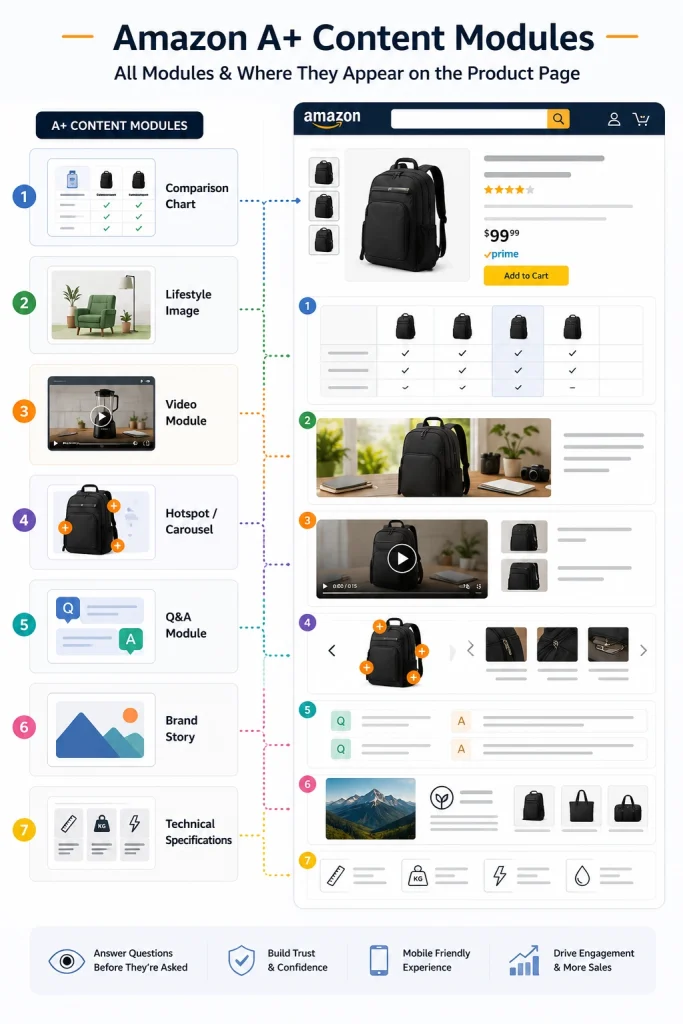
Comparison Charts: Best When Shoppers Compare Variants
If you sell products in different sizes, bundles, flavors, models, or configurations, a comparison chart is one of the most effective modules you can use. It helps shoppers choose the right option without leaving your listing to compare competitors.
A strong comparison chart uses clean, consistent product shots, highlights the key differences between each option, and avoids cramming too many columns or data points into a single table. The goal is to simplify the decision, not overwhelm it.
Shoppable comparison tables that include "Add to Cart" buttons can also drive cross-selling within your catalog. This is especially useful for brands with product lines that complement each other.
Feature Highlight Images: Best for Visual Proof of Benefits
Feature highlight modules turn your product's key benefits into quick visual proof points. Think infographic-style layouts with clear icons, short supporting text, and a focused image showing the specific feature in action.
The quality of these visuals matters significantly. Blurry images, cluttered layouts, and tiny text crammed into image files hurt credibility. Professional infographic design creates a polished look that signals quality. If your current product photos need work, a solid ecommerce photography guide can help you build a stronger visual foundation before designing your A+ modules.
Lifestyle Imagery: Best for Helping Shoppers Visualize Ownership
Lifestyle images show your product being used in real settings. A kitchen gadget on an actual countertop, a backpack on a hiker's shoulders, or a skincare product being applied in a bathroom context.
These images help shoppers answer the question, "Will this work for me?" Lifestyle photography that feels authentic performs better than generic stock imagery. The setting, lighting, and composition should reflect how your target customer actually uses the product.
Objection-Handling Feature Modules: Best for Reducing Purchase Hesitation
This is a concept more than a specific module type. You can use image-and-text modules, technical specification tables, or even comparison charts to address the common questions and concerns that stop shoppers from buying.
Will it fit? Show exact dimensions. Is it compatible? List supported devices. What is included? Display the full package contents. How does it work? Walk through the setup process visually.
Turning pre-purchase objections into clear visual answers is one of the highest-impact things you can do with A+ Content. Review your product's customer feedback, Q&A section, and common return reasons to identify the most important objections to address.
Video Modules: Best for Products That Need Demonstration (Premium Only)
When your product benefits from movement, scale, texture, or step-by-step setup, a video module can communicate things that static images simply cannot. Premium A+ Content supports video modules, and they are particularly effective for electronics, beauty products, fitness equipment, kitchen tools, and products with assembly requirements.
Keep videos short, focused, and benefit-led. A 30 to 60 second video that shows the product in action will outperform a three-minute brand commercial every time.
Brand Story Module: Best for Building Trust Across Your Catalog
Your Brand Story gives shoppers context about who you are and why your brand exists. It supports brand trust, customer engagement, and cross-selling by linking to your other products and your Amazon Brand Store.
Keep your brand storytelling consistent across all ASINs. If every product page tells a different brand story, the inconsistency can confuse shoppers rather than build confidence.
How to Create A+ Content on Amazon
Step 1: Verify Your Eligibility
Before designing anything, confirm that your brand is enrolled in Amazon Brand Registry and that you have the correct selling role assigned. Log into Seller Central, navigate to the A+ Content Manager (under Advertising), and check which content types are available to you.
If you do not see the A+ Content Manager option, your account may not meet the current eligibility requirements. Resolve this before investing time in content creation.
Step 2: Open the A+ Content Manager
Once verified, go to Advertising and select A+ Content Manager. This is where you create, edit, preview, and submit all your A+ Content projects.
Amazon Seller University also provides tutorials on using the A+ Content Manager if you are building content for the first time.
Step 3: Choose Your Content Type
Select whether you want to create Basic A+ Content, Premium A+ Content (if eligible), or a Brand Story. You can create both a Brand Story and product-specific A+ Content for the same listing.
Step 4: Map Modules to Buyer Questions
This is where most sellers make strategic mistakes. Do not choose modules based on how they look in the preview. Choose them based on what your buyer needs to understand.
Ask yourself: What should the shopper know first about this product? What objection could stop them from buying? What feature needs a visual explanation rather than just text? What comparison would help them choose the right variant? What information cannot be communicated effectively through bullet points alone?
Let these questions guide your module selection and sequencing.
Step 5: Add Images, Copy, and Alt Text
Upload your visual assets and write supporting copy for each module. Your images should be high-resolution, professionally edited, and designed specifically for the module dimensions rather than cropped from generic product photos. Following product photography best practices ensures your source images are strong enough to build on.
For copy, keep text short, specific, and benefit-focused. Avoid vague phrases like "premium quality" or "designed for modern living." Instead, describe what the product actually does and why it matters. For example: "Double-wall stainless steel keeps drinks cold for 12 hours, ideal for school, office, and gym."
Fill every image alt text field with a clear, accurate description of what the image shows. This is primarily an accessibility feature that helps shoppers using screen readers understand your visual content.
Step 6: Assign ASINs and Preview on Mobile
After building your content, assign it to the correct ASINs. You can apply A+ Content to individual ASINs, parent ASINs, or groups of related products.
Before submitting, preview your content on both desktop and mobile. Mobile preview is critical because a large portion of Amazon shoppers browse on their phones. Content modules stack vertically on mobile, images can crop differently, and text-heavy modules may feel overwhelming on smaller screens.
Check that your most important information appears early in the module sequence. On mobile, the first two modules shape the shopper's initial impression of your A+ section.
Step 7: Submit for Review
Submit your completed A+ Content for Amazon's review. Amazon reviews submitted content before it goes live, and review times can vary. Plan your content timeline accordingly, especially before product launches or seasonal campaigns.
If your content is rejected, Amazon will indicate the reason. Common rejection triggers include promotional language, competitor mentions, unsupported claims, and non-compliant images. Correct the issues and resubmit.
A+ Content Image Sizes and Design Specs
A+ Content modules each have specific image dimension requirements. Uploading images that do not match these dimensions can result in cropping, stretching, or blurry displays.
The safest approach is to check the exact pixel requirements for each module directly within Amazon's A+ Content Manager when you begin designing. Amazon has adjusted these specifications over time, and the dimensions shown in the module builder are always the most current reference.
General requirements that apply across modules: images must be in JPEG or PNG format, RGB color mode, and typically no larger than 2 MB per file. Amazon may compress uploaded images, so preview the final result carefully, especially for images containing text.
Design Practices That Impact Conversions
Amazon requires that your uploaded images meet the specified dimensions and file format. Beyond that, the quality of your visual design directly affects whether shoppers engage with your content or scroll past it.
Avoid embedding small text directly into images. What looks readable on a desktop monitor becomes unreadable on a mobile phone screen. If your module requires text-heavy explanations, use the text fields Amazon provides rather than baking text into the image.
As a design best practice (not an Amazon requirement), work from a larger source file and export the final version at Amazon's required dimensions. This helps maintain sharpness, especially on high-density mobile screens.
Maintain consistent brand colors, typography, and visual style across all your A+ modules. Inconsistent design looks unprofessional and undermines the brand trust you are trying to build.
Use infographic-style layouts for feature highlights rather than cluttered photo collages with competing visual elements. Each image should have one clear purpose. If an image does not help the shopper understand your product better, replace it.
Professional product photo retouching and image editing make a visible difference in A+ Content quality. Clean backgrounds, accurate color correction, and properly lit product shots are the foundation that makes every module look credible.
Frequently Asked Questions
Is Amazon A+ Content Free?
Yes. Amazon does not charge eligible brand-registered sellers to create and publish A+ Content. The cost comes from content creation itself, including product photography, image editing, infographic design, banner design, and copywriting.
Does A+ Content Affect Amazon SEO?
Not directly. Amazon's internal search algorithm primarily uses your title, bullet points, and backend search terms for ranking. A+ Content is not indexed by Amazon's search engine in the same way.
How Long Does A+ Content Approval Take?
Amazon reviews A+ Content before publishing it. Review times can vary but are commonly referenced as taking up to 7 business days. Plan ahead, especially before product launches or seasonal campaigns.
Can I Edit A+ Content After Publishing?
Yes. You can edit published A+ Content through the A+ Content Manager in Seller Central. Updated content will go through another review cycle before the changes appear on your product detail page.
Can I Add Video to A+ Content?
Video modules are available through Premium A+ Content. Basic A+ Content does not include video as a standard module option. If video is important for your product, such as demonstrations, setup guides, or showing texture and scale, check whether your account qualifies for Premium A+ Content.
Do I Need Amazon Brand Registry for A+ Content?
For most sellers, yes. Enrollment in the Brand Registry Program is the standard eligibility requirement. Some sellers with generic products may also qualify, but Brand Registry is the primary path. Enrollment requires an active registered trademark for your brand.
What Are 360 Degree Product Views and Hover-Over Images in A+ Content?
These are interactive features available through Premium A+ Content. 360-degree product views allow shoppers to rotate a product image. Hover-over images (interactive hotspots) let shoppers click or tap on specific areas of an image to see feature details.
Final Thoughts
A+ Content only works as well as the visual assets behind it. The best module strategy in the world cannot compensate for blurry product photos, inconsistent branding, or cluttered infographic design. Strong visuals are the foundation of every high-converting A+ listing.
Whether you are building A+ Content for the first time or reworking an existing layout, investing in professional image editing, clean infographic design, and polished lifestyle photography gives your content the quality it needs to actually drive results. That is exactly what our ecommerce photo editing team helps sellers achieve every day.