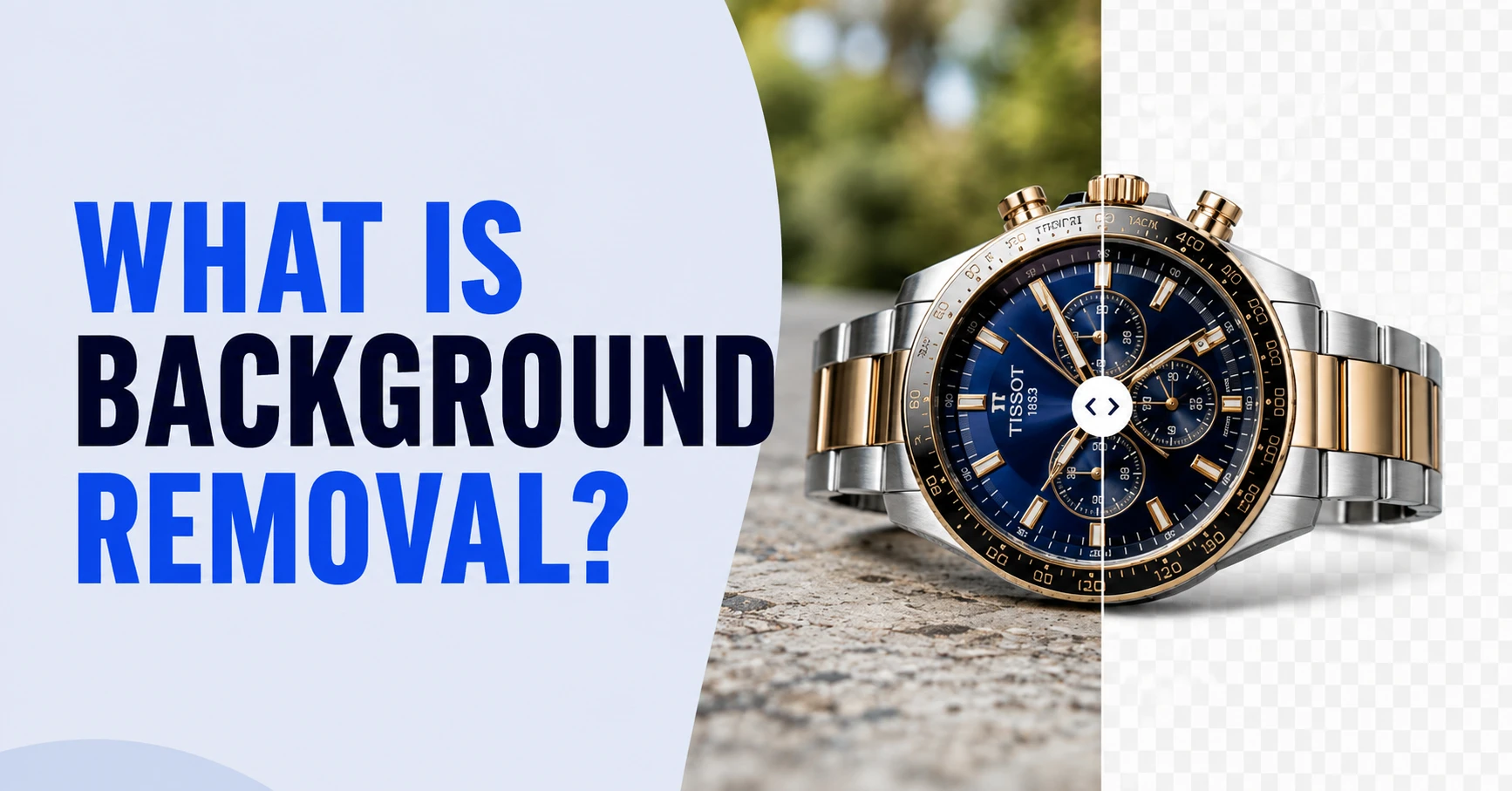
Removing background is one of the core groundwork in photo editing services. Background removal is the process of separating a subject, such as a product, a person, or an object, from its original background and replacing it with a clean, transparent, or solid-color alternative. The result is a distraction-free image that puts full focus on the subject.
You shot 200 product photos and uploaded them to your store, and sales barely moved. The problem is not your product. It is the messy, inconsistent backgrounds stealing attention from the thing your customer actually wants to buy. This is exactly why background removal exists.
Ecommerce platforms demand background removal services more than other industries. Marketplaces enforce it and shoppers trust brands that deliver polished, professional visuals, not cluttered snapshots taken on a kitchen table.
In this guide, you will learn what background removal is, how it works, which methods suit your needs, and where it makes the biggest impact on your business.
Key Takeaways
- Background removal is the process of isolating a subject from its surroundings and replacing the original backdrop with a transparent, white, or custom background.
- Top methods include manual clipping paths, image masking, AI-powered tools, and hybrid workflows that combine automation with human refinement.
- Clean product images boost conversion rates, reduce return rates, and meet marketplace compliance standards on Amazon, Shopify, and Walmart.
- Industries that rely on it most are e-commerce, fashion and apparel, real estate, portrait photography, jewelry, and automotive.
- Choosing between DIY tools and professional services depends on volume, edge complexity, and how much quality matters to your brand.
What Is Background Removal?

Your product photo looks great until a cluttered background steals attention from the item your customer actually wants to buy. That is the exact problem background removal solves.
So, what is background removal at a technical level? It is an image editing technique where the editor or an AI tool identifies the boundary between the subject and its surroundings, isolates the subject along that edge, and deletes everything outside it. What remains is a clean cutout, ready to be placed on any backdrop you need.
Think of it like cutting a figure out of a magazine. Except digitally, with pixel-level precision, and without the rough edges. This technique is used across e-commerce catalogs, marketing creatives, real estate listings, and portrait photography.
Whether you are an online store owner preparing product shots for Amazon or a photographer delivering headshots to corporate clients, background removal is the foundation of nearly every polished image you see online.
The quick answer: if your image has a distracting, inconsistent, or non-compliant background, removing it is the fastest way to make that photo work harder for your business.
Why Is Removing the Background So Important?
A background might seem like a small detail, but it directly impacts how customers perceive your product and your brand. Here is why it matters.
Marketplace Compliance Requirements
Amazon, Walmart, Shopify, and eBay all enforce strict image guidelines. Most require a pure white background (RGB 255, 255, 255) for primary product listings. Fail to comply, and your listing may get suppressed or rejected outright. For e-commerce managers handling hundreds of SKUs, a reliable e-commerce image editing workflow is non-negotiable.
Higher Conversion Rates on Clean Product Images
Shoppers form a first impression in milliseconds. Cluttered backgrounds create hesitation. Clean, isolated product photos reduce cognitive friction and guide the eye straight to the item. Studies consistently show that products displayed on white or transparent backgrounds see higher click-through and conversion rates compared to noisy lifestyle shots on listing pages.
Brand Consistency Across a Catalog
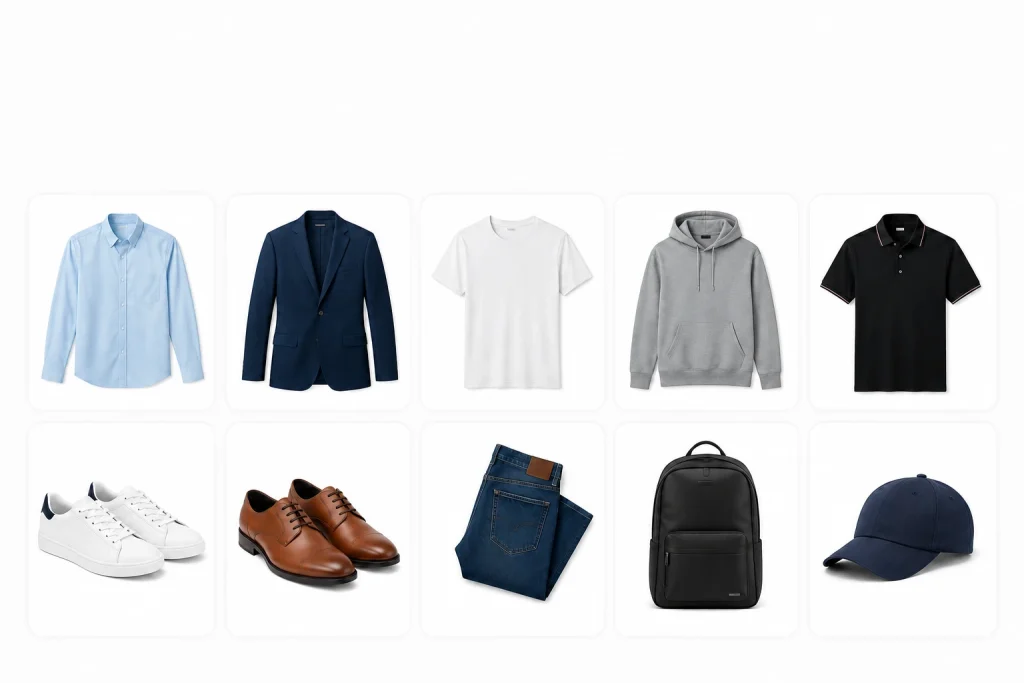
When every product photo in your catalog sits on a uniform background, the visual consistency reinforces trust. This matters especially for fashion brands, retail chains, and DTC companies managing large catalogs. Background removal ensures that a shirt photographed in a studio and a pair of shoes shot on location look like they belong to the same brand.
Creative Flexibility for Multi-Channel Use
Once the background is removed, the isolated subject can be dropped into any context. A banner ad, a social media carousel, a print catalog, or a comparison shopping engine feed. One clean cutout gives your creative team unlimited flexibility without reshooting.
Benefits of Removing Image Backgrounds for Your Marketing Strategy
Stronger Ad Creative and A/B Testing Flexibility
With isolated product images on hand, marketing teams can quickly generate multiple ad variations. Swap background colors, test seasonal themes, or create composite images, all without booking another photo shoot. This kind of speed gives ad agencies and in-house marketing teams a real competitive edge in A/B testing.
Consistent Brand Presentation Across Channels
Your website, Amazon store, Instagram feed, and print catalog should all feel like one brand. When you start with a cleanly isolated image, achieving that consistency becomes straightforward. Professional photo editing services make this scalable, even across thousands of images.
Faster Content Production at Scale

Speed matters. A catalog launch with 500 new SKUs cannot wait weeks for post-production. Batch background removal, whether done through manual teams or hybrid AI-plus-human workflows, accelerates the pipeline from shoot to publish. For brands running seasonal drops or flash sales, this is a critical advantage.
Better Performance on Marketplaces and Comparison Shopping Engines
Google Shopping, PriceGrabber, and similar platforms favor product images with white or clean backgrounds. Images that meet these standards earn better placement, higher click-through rates, and ultimately more sales. What is background removal if not the simplest upgrade you can make to your marketplace performance?
Types of Image Background Removal Services
Not all background removal is the same. The right method depends on the complexity of the image, the volume you need processed, and the level of precision your brand requires.
Manual Clipping Path Services
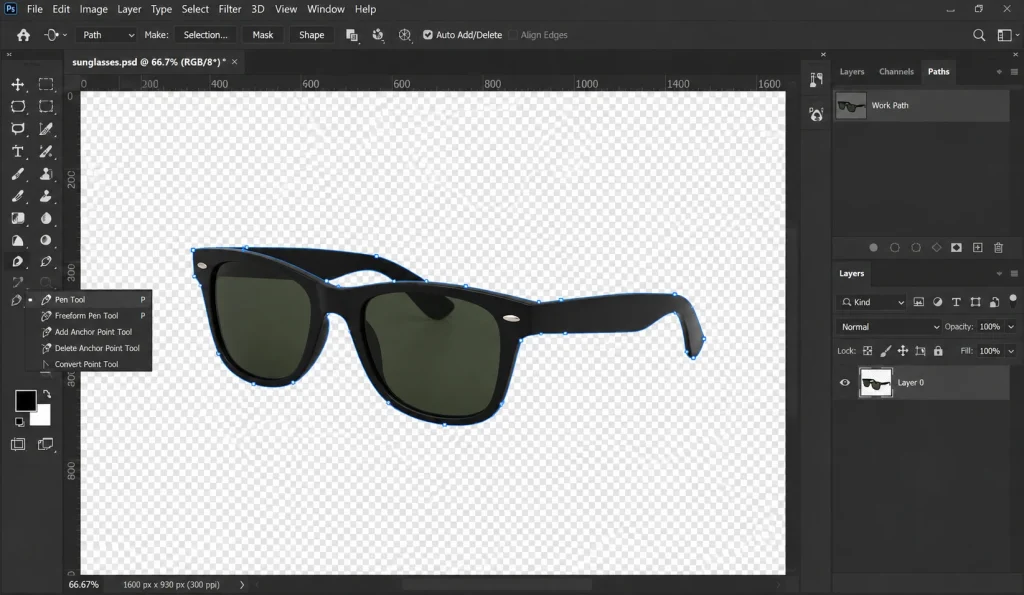
A clipping path is a hand-drawn vector outline traced around the subject using the Pen Tool in Photoshop. It is the gold standard for hard-edged objects like electronics, packaging, footwear, and furniture. The editor draws anchor points along every curve and corner, then uses that path to separate the subject from the background with pixel-level accuracy. This method delivers the cleanest results for products with well-defined edges.
Image Masking Services
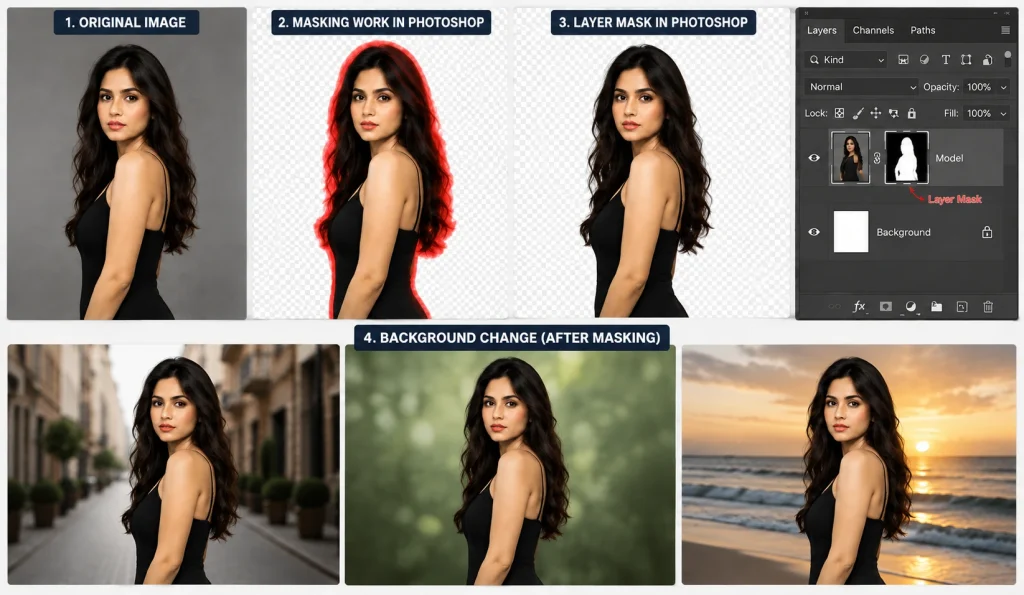
When the subject has soft, translucent, or intricate edges, think hair, fur, lace, or sheer fabric, a clipping path alone will not cut it. Image masking uses alpha channel techniques and layer masks to preserve those fine details. The result is a natural-looking extraction where delicate edges blend seamlessly into the new background. This is essential for portrait studios, beauty brands, and fashion catalogs.
A translucent edge or background is any area in an image that is partially see-through, not fully solid, not fully transparent. Think of a wine glass, a sheer fabric, or the wispy ends of hair. Light passes through these areas. So, the background behind them is partially visible.
Hybrid (AI + Manual Refinement) Workflows
Many professional editing teams now combine AI-powered auto-detection with manual cleanup. The AI handles the initial rough cutout in seconds, and a trained editor refines the edges, corrects color fringing, and handles problem areas like transparent glass or motion blur. This hybrid approach balances speed with quality, making it ideal for brands that need high volumes without sacrificing precision.
Bulk/API Background Removal for Catalogs
For e-commerce operations managing thousands of SKUs, API-based solutions can integrate directly into your product information management (PIM) or digital asset management (DAM) system. Images are processed automatically as they enter the pipeline. However, fully automated bulk processing works best for simple product shapes. Complex items still benefit from human review.
AI-Powered Automatic Removal
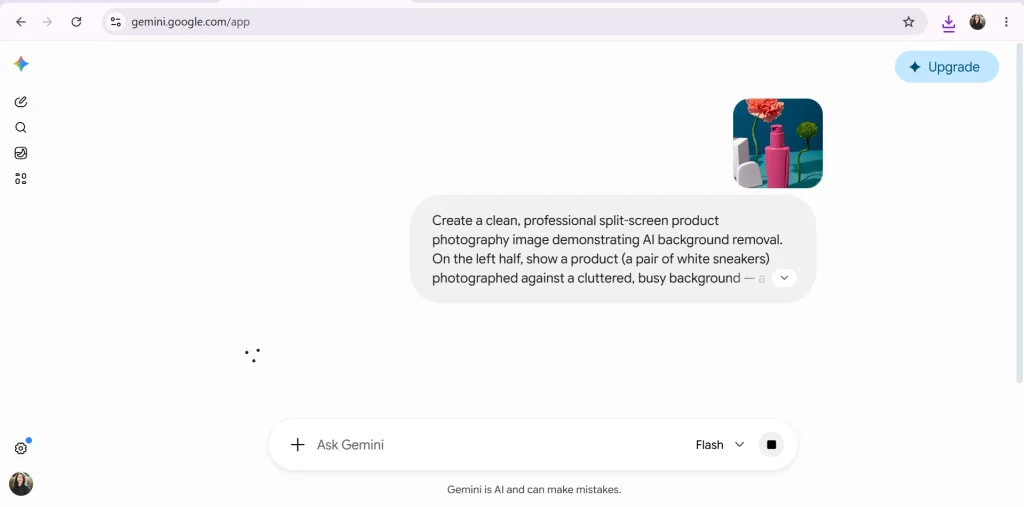
AI tools use image segmentation algorithms trained on millions of photos to detect the subject and strip the background. They work well for straightforward images with clear contrast between the subject and its surroundings. For quick social media posts or internal mockups, AI tools are fast and cost-effective. But they struggle with fine edges, reflections, and semi-transparent materials.
Transparent vs. White Background: Which Do You Need?
Not every image needs the same background treatment. The right choice depends on where the image will be used and who will work with it next. Here is a quick side-by-side before we break each one down.
| Criteria | Transparent (PNG) | White (JPEG) |
|---|---|---|
| What it is | No background data; alpha channel preserves emptiness | Solid white fill (RGB 255, 255, 255) behind the subject |
| Best for | Design composites, ads, banners, multi-channel reuse | Marketplace listings, catalog pages, comparison engines |
| File format | PNG | JPEG |
| File size | Larger | Smaller |
| Design flexibility | Drop on any color, pattern, or layout, no halos | Fixed white; works as-is on white page layouts |
| Required by | Creative teams, agencies, print designers | Amazon, eBay, Walmart, Shopify (primary images) |
| Recommended use | Keep it as your master file | Export from master for web and marketplace uploads |
What a Transparent (PNG) Background Means
A transparent background means the area around the subject contains no color data at all. It is saved as a PNG with an alpha channel. This gives designers complete freedom to place the product on any background color, pattern, or composite without visible edges or white halos. It is the most versatile format for creative teams working across multiple channels.
What a White Background Means and When Marketplaces Require It
A pure white background (RGB 255, 255, 255) is the standard format required by Amazon, eBay, Walmart, and most major marketplaces for primary listing images. It delivers a clean, distraction-free look that keeps the focus on the product. If you sell on these platforms, white-background images are mandatory, not optional.
File Size and Format Trade-offs
In terms of file type, size, and formatting, PNGs with transparency tend to be larger files than JPEGs with white backgrounds. For web performance, this matters. A product listing page with 50 high-resolution PNGs will load slower than one using optimized JPEGs. The practical approach is to export transparent PNGs as your master files and generate white-background JPEGs for marketplace uploads and web use.
How Background Removal Is Handled in Professional Workflows
Understanding what is background removal at a professional level is means looking at the actual workflow editors follow. Here is how it typically works.
Step 1: Image Assessment (Edge Complexity, Lighting, Contrast)
Before touching a single pixel, the editor evaluates the image. They check edge complexity (hard edges vs. soft/fuzzy edges), contrast between the subject and background, and lighting consistency. Whether the image contains transparent or reflective surfaces. This assessment determines which technique – clipping path, masking, or hybrid – will deliver the best result.
Step 2: Choosing the Right Technique (Pen Tool vs. Masking vs. AI)

Based on the assessment, the editor selects the appropriate tool. A clean product shot with hard edges goes to the Pen Tool. A model with flowing hair gets layer masking or channel-based extraction. A batch of simple product photos may get an initial AI pass followed by manual refinement. Professional Photoshop editing services combine all three methods depending on the job.
Step 3: Refinement: Feathering, Edge Cleanup, Shadow Handling
The raw cutout rarely looks perfect. Editors apply feathering to soften jagged edges and clean up color fringing (the halo effect from the original background bleeding into the subject). Add or adjust drop shadows for a natural, grounded appearance. This refinement step is what separates amateur cutouts from professional results.
Step 4: Quality Control and Final Export
The finished image is reviewed at 100% zoom for edge accuracy, color consistency, and any artifacts. It is then exported in the required format. PNG for transparent backgrounds, JPEG for white backgrounds, at the resolution and color profile specified by the client or marketplace. Multi-step quality control is standard in professional workflows.
Need clean, consistent product images at scale?
Get a free trial from Offshore Clipping and see the quality for yourself.
Get My Free Trial!
Handmade Background Removal Using Software
What “Handmade” Removal Means
Handmade (or manual) background removal means a trained editor uses Adobe Photoshop tools. The Pen Tool, Lasso, or layer masks to trace and extract the subject by hand. No automation. Every anchor point, every curve, every edge is placed deliberately. This is the approach that delivers the highest precision, especially for complex or high-value images.
Manual Techniques: Pen Tool, Lasso, Layer Masking
The Pen Tool creates smooth, scalable Bezier paths. This is the best choice for clean, hard-edged subjects. The Lasso tool offers quick, freehand selections useful for rough drafts or simple shapes. Layer masking uses grayscale maps to control visibility at the pixel level, preserving soft edges and semi-transparent areas. Skilled editors often combine all three within a single image.
When Handmade Editing Outperforms AI
AI tools plateau when images involve overlapping subjects, reflections on glass, intricate jewelry details, fine hair against busy backgrounds, or ghost mannequin composites for apparel. In these situations, manual editing consistently produces cleaner, more natural results. For fashion brands and product photographers, this difference directly affects how their work is perceived.
Skills Needed for Manual Background Removal
Effective manual removal requires
- A strong eye for detail
- Proficiency with Photoshop pen and masking tools
- An understanding of color channels and alpha compositing
- The patience to work at extreme zoom levels
It is a specialized skill that professional retouchers develop over years of practice.
Tools to Remove the Background from an Image
Free AI Tools (remove.bg, Canva BG Remover, Pixlr, Adobe Express)
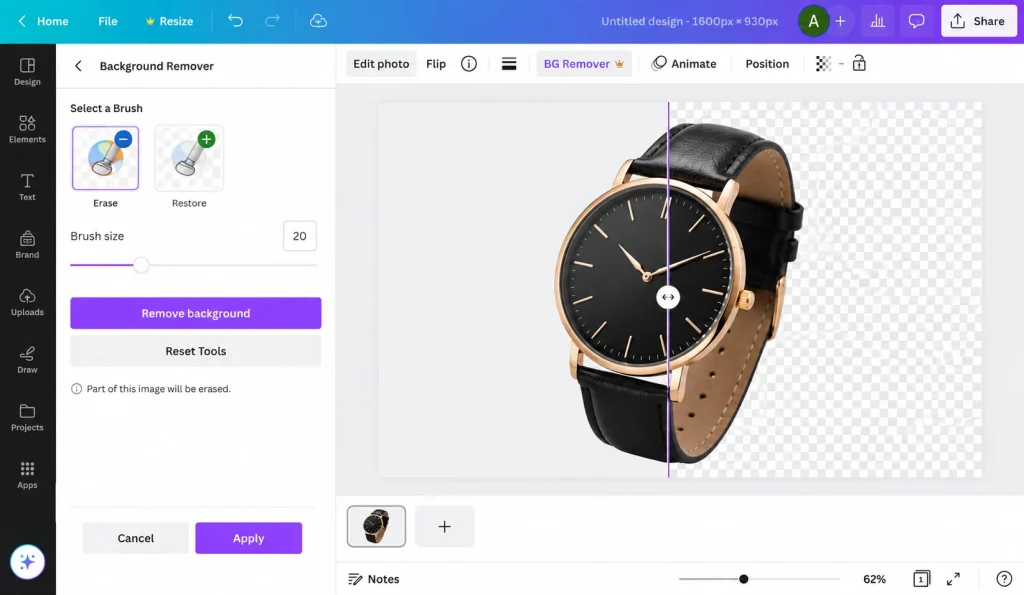
Free AI-based tools like remove.bg, Canva Background Remover, Pixlr, and Adobe Express offer one-click background removal. They work surprisingly well for simple subjects with clear edges: portraits on plain backgrounds, basic product photos, or social media graphics. The trade-off: output resolution may be limited, fine edges get rough, and customization options are minimal.
Advanced Editing Software (Adobe Photoshop, GIMP)
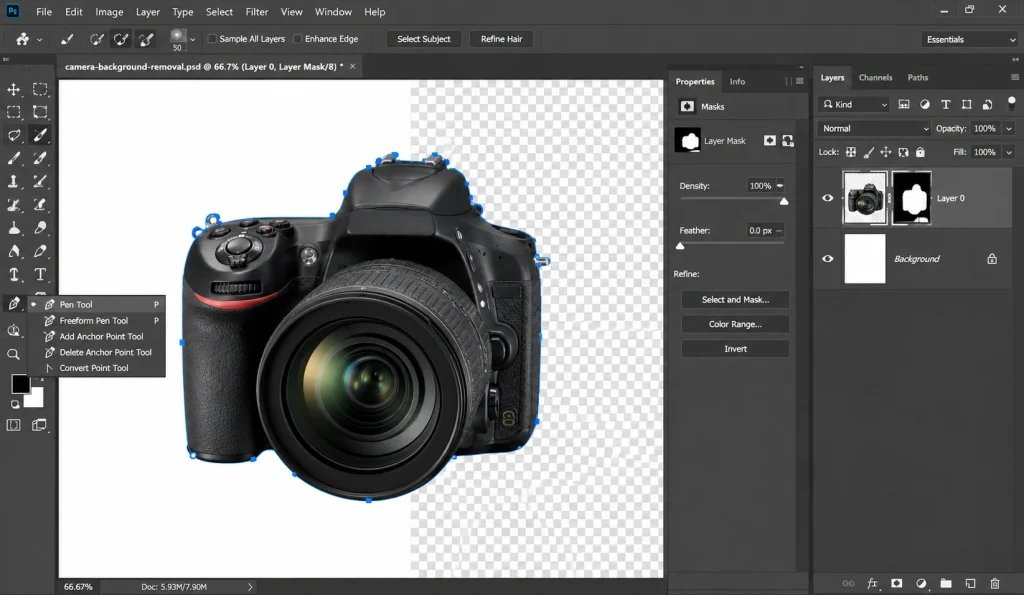
Adobe Photoshop remains the industry standard for background removal. Its Pen Tool, Select and Mask workspace, and layer masking give editors complete control over every detail. GIMP is a capable free alternative with similar core functionality, though its interface is less refined. For studio owners and freelance photographers who need pixel-perfect results, these tools are essential.
Bulk/API Solutions for Businesses (Removal.AI, remove.bg API)
For businesses processing high volumes, think e-commerce catalogs with thousands of product images. API-based solutions let you automate background removal at scale. These APIs integrate with your existing DAM or PIM systems, processing images in seconds. Quality varies by image complexity, so many teams use these for the first pass and send complex images to manual editors for refinement.
Mobile Apps for On-the-Go Editing
Apps like PhotoRoom and Background Eraser bring AI-powered removal to your phone. They are handy for quick social media posts, marketplace listings from a phone camera, or initial mockups. Content creators and influencers frequently use these for fast turnaround on Instagram and TikTok content.
What Does Background Removal Cost?
Free and Freemium AI Tools
Most AI tools offer free tiers with limitations. Lower resolution output, watermarks, or a fixed number of free removals per month. For casual use or testing, these work fine. For commercial use at scale, they typically require a paid subscription.
Professional Per-Image Pricing (Simple vs. Complex Subjects)
Professional services typically charge per image based on complexity. Simple cutouts (a book, a phone, a box) start as low as $0.29 per image. Medium-complexity subjects (shoes, handbags, grouped products) run higher. Complex or super-complex work like jewelry, intricate furniture, or multi-subject composites can range from $2 to $7+ per image. Check Offshore Clipping’s pricing for a detailed breakdown by complexity level.
Bulk/Volume Discounts for Catalogs
Most professional editing services offer volume discounts for large orders. If you are launching a seasonal catalog with 500+ SKUs or managing ongoing product photography, bulk pricing makes outsourcing far more cost-effective than hiring in-house editors.
What Affects the Price (Edges, Transparency, Turnaround)
Four factors drive the price: edge complexity (hard vs. soft). Whether transparency or shadow effects are needed, the output format and resolution requirements, and turnaround speed. Rush jobs cost more. Simple shapes on clean backgrounds cost less. Understanding these variables helps you budget accurately.
Industries & Niches That Rely on Background Removal
What is background removal without context? Here are the industries where it makes the biggest impact.
Ecommerce Product Catalogs
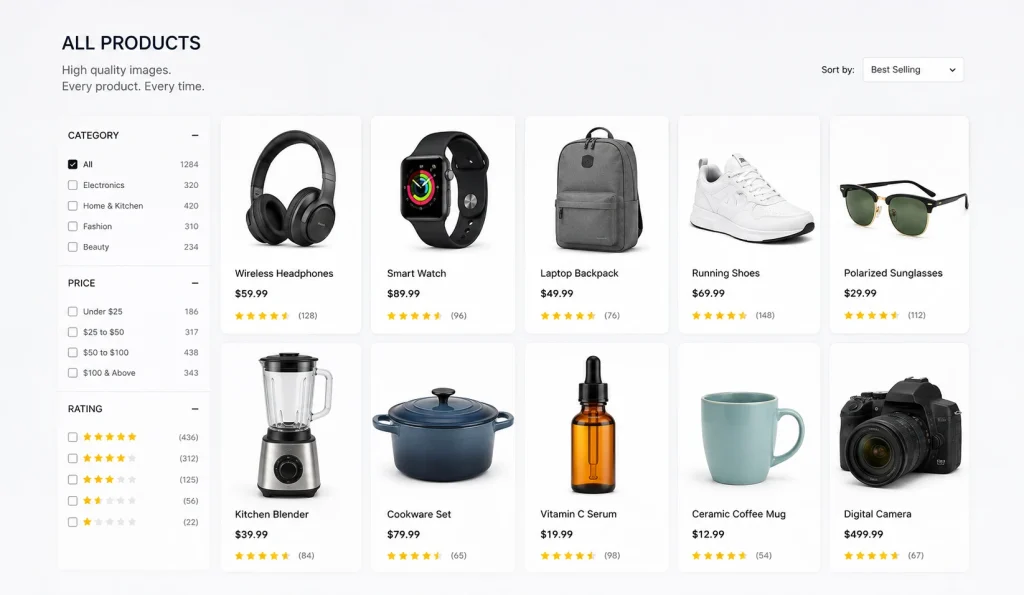
Online retailers live or die by product image quality. From Amazon and Shopify storefronts to Walmart Marketplace listings, clean product photos with compliant backgrounds are a basic requirement. Ecommerce managers and catalog teams rely on background removal for every single SKU in their inventory.
Fashion & Apparel Brands (Bulk Photo Editing)

Fashion brands deal with high image volumes every season. New arrivals, lookbooks, and marketplace feeds all need consistent product images. Between flat lays, on-model shots, and ghost mannequin composites, apparel brands are among the heaviest users of professional background removal services.
Real Estate and Automotive Listings
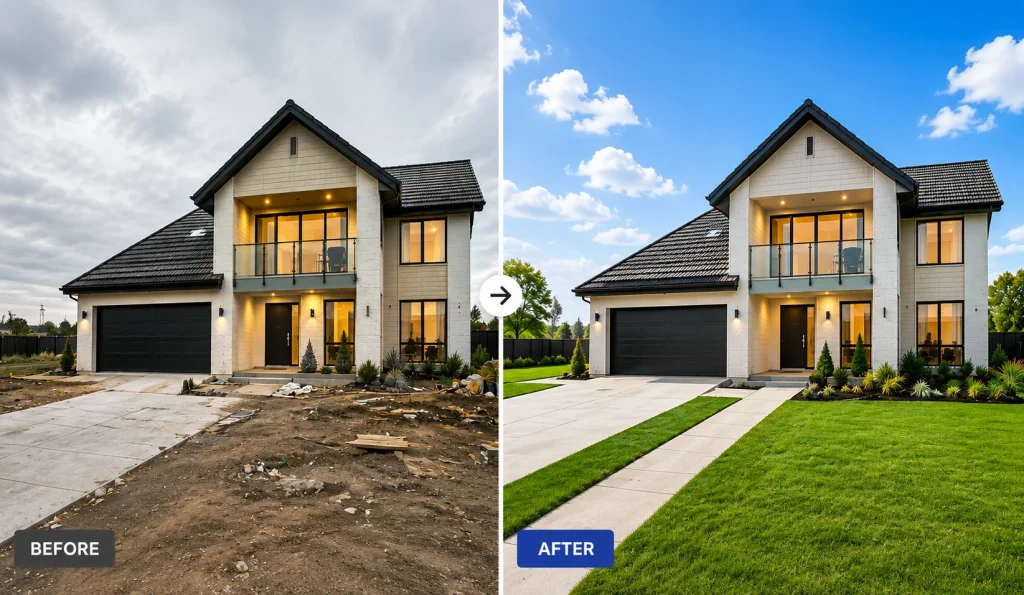
Real estate agents and property consultants use background removal and replacement to enhance listing photos. They swap overcast skies for blue ones, clean up construction clutter in exterior shots, or isolate a property for composite marketing materials. The same logic applies to automotive dealers showcasing inventory online.
Portrait and Headshot Studios

Studio owners and freelance photographers delivering corporate headshots, actor portfolios, or school photos frequently need to swap backgrounds to match client specifications. A single portrait session can generate dozens of final images, each requiring a different background treatment.
Jewelry & Watches (Precision Editing)

Jewelry photography demands the highest level of editing precision. Reflective surfaces, transparent gemstones, and intricate metalwork make automated tools unreliable. This niche relies almost exclusively on manual clipping path and masking services to achieve the flawless results that luxury buyers expect.
Ghost Mannequin and Print Catalog Photography
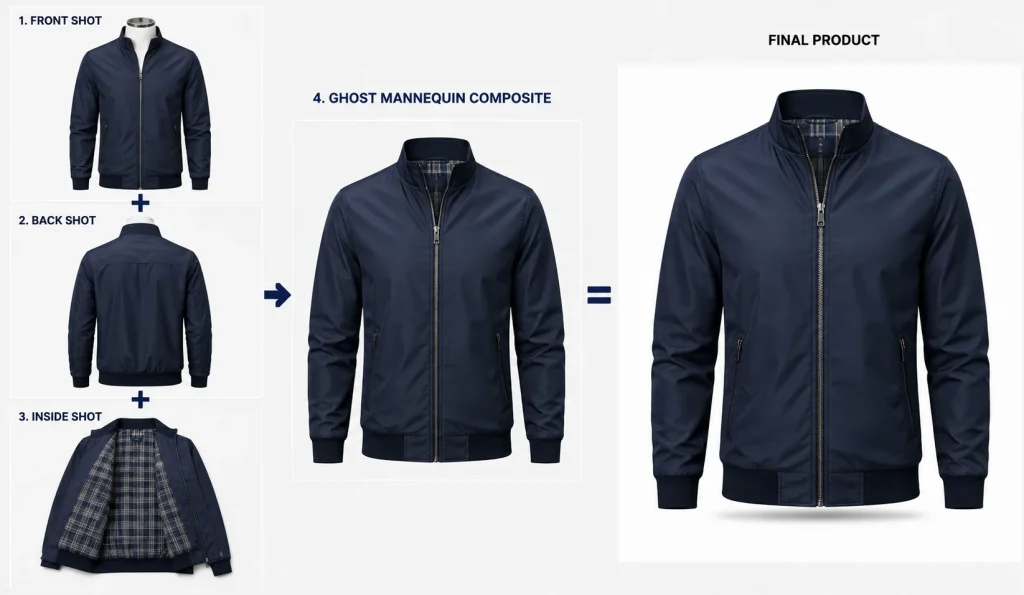
Apparel brands that shoot on mannequins need the mannequin removed in post-production to create a hollow, 3D product effect. This specialized workflow combines front, back, and interior shots into a single composite. This is a distinct form of background removal that requires expert-level Photoshop skills.
When Should You Remove an Image Background?
When Background Removal Helps
Remove the background when you are creating product listing images for marketplaces, building a consistent product catalog, designing ad creatives, preparing images for print materials (brochures, catalogs, packaging), or shooting headshots and portraits that need a clean, professional finish.
When to Keep the Background
Keep the background when the setting adds value to the story. Lifestyle photography for social media, environmental portraits, real estate interiors, food photography in context, or brand campaigns that rely on authenticity and atmosphere. The background is part of the message in these cases.
A Quick Decision Checklist
Ask yourself three questions.
- First, does the background add context or distract?
- Second, does the platform you are publishing to require a specific background?
- Third, will this image be reused across multiple channels?
If the background distracts, the platform demands compliance, or you need multi-channel flexibility, remove it.
Frequently Asked Questions
What is background removal in simple terms?
It is the process of cutting out the main subject from a photo and placing it on a clean, transparent, or solid-color background. The goal is to eliminate distractions and make the subject the sole focus of the image.
Is background removal the same as clipping path?
Not exactly. A clipping path is one method used to remove backgrounds. Specifically, a hand-drawn vector path around the subject. Background removal is the broader goal; clipping paths, image masking, and AI extraction are the techniques used to achieve it.
What’s the best free tool to remove a background?
For casual or low-volume use, remove.bg and Canva Background Remover are the most popular free options. They handle simple images well. For anything complex, such as fine hair, transparent objects, or bulk catalogs, professional editing services deliver far better results.
How long does professional background removal take?
Turnaround depends on volume and complexity. Simple product cutouts can be delivered within hours. Large catalog batches (500+ images) typically take 24 to 48 hours. Rush delivery is usually available for an additional fee.
Can you remove a background without Photoshop?
Yes. Free tools like remove.bg, GIMP, Canva, and mobile apps like PhotoRoom all offer background removal without Photoshop. However, Photoshop remains the most accurate and versatile option. Especially for complex or high-stakes images where precision matters.
Conclusion
Understanding what is background removal is the first step toward producing images that actually convert. Whether you are managing a 10,000-SKU ecommerce catalog, editing headshots for a photography studio, or preparing ad creatives for a multi-channel campaign, the fundamentals remain the same. Isolate the subject, clean up the edges, and deliver a polished image that meets your platform’s standards.
The method you choose, this can be manual clipping paths, image masking, AI tools, or a hybrid workflow. This depends on your volume, budget, and quality requirements. For simple, one-off images, free AI tools get the job done. For anything that represents your brand at scale, professional background removal services are the smarter investment.