Yes, Gemini can edit photos. You upload an image, describe the change in plain language, and Google Gemini hands back an edited version. Free accounts included. No editing software required.
But here is the part that trips people up. Three different Google products edit photos, and they follow different rules. You might find answers online that conflict because authors are describing different tools without saying so.
I went through the fine print, including the eligibility rules almost nobody mentions. Some of it explains exactly why your edit keeps failing. Here is the honest picture.
Weighing Gemini against the obvious alternative? We ran the same test on the other side in Can ChatGPT Edit Photos?.
Can Gemini Edit Photos? The Short Answer
Yes. Gemini Apps can edit uploaded photos using Nano Banana 2, the current Gemini Image model, on both web and mobile. You upload a photo, type what you want changed in natural language, and it generates the edit. This works on the free tier, per Google’s own documentation.
One catch matters more than any other, and it is buried in Google’s help pages. Editing images is not available to users under 18. Generation has a lower age floor, but editing is locked to adults on a personal Google Account.
What Is Nano Banana? (And How It Actually Edits)
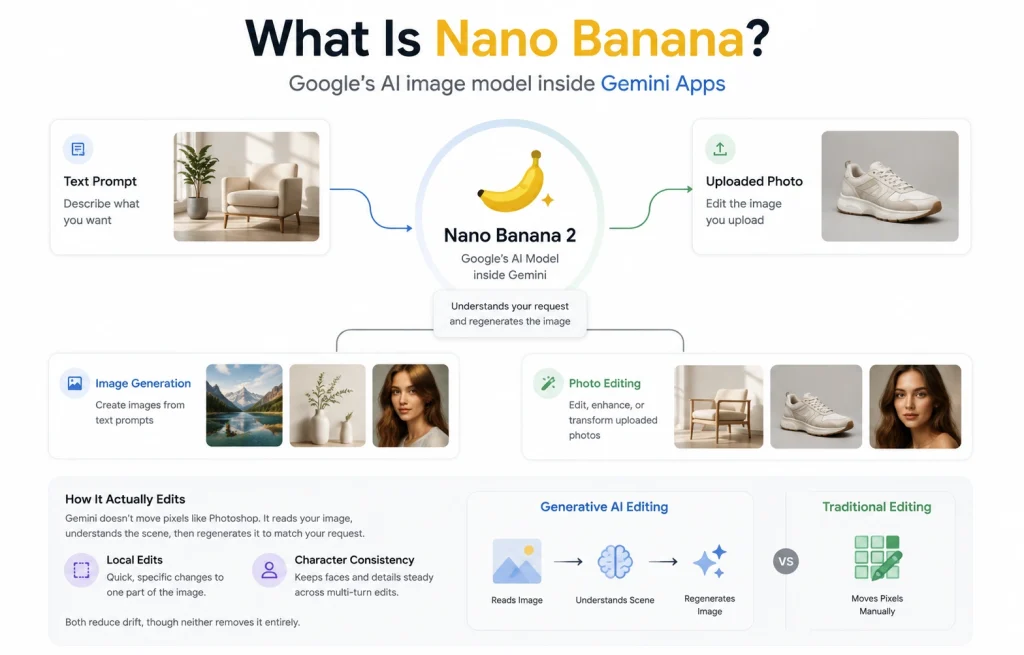
Nano Banana is not an app, a phone feature, or a separate product you download. It is the name of Google’s AI image editor model, the engine running inside Gemini Apps. Understanding that clears up most of the confusion around this topic.
It doubles as an AI image generator and an editor. The same model that handles image generation from a text prompt also edits the photo you upload, which is why both live in the same chat box.
Nano Banana 2 is the current default, and Google points to better world knowledge, stronger text rendering, and character consistency as its headline gains. Nano Banana Pro, built on Google Gemini 3 Pro, is the higher-quality option paid subscribers reach through the Redo with Pro button. Google is also retiring its older Imagen models in favour of Nano Banana.
Now the mechanic. Gemini does not shift pixels the way Adobe Photoshop does. It reads your image, understands the scene, then regenerates it to match your request. That is generative AI doing image manipulation, not traditional editing.
Gemini softens this with local edits, which apply quick, specific changes to one part of an image rather than rebuilding everything. Character consistency also helps hold a face steady across a multi-turn chat. Both reduce drift, though neither removes it.
| If you want the manual equivalent, see how professional image manipulation handles the same jobs. |
Three Google Products Edit Photos, and They Are Not the Same
This is the distinction that resolves most of the contradictory advice online. All three run on Gemini models, but who can use them and what they are good at differ sharply.
| Product | Where you use it | Who can use it | Best for |
|---|---|---|---|
| Gemini Apps | gemini.google.com and the mobile app | 18+, wherever the app and supported languages reach | Creative edits, style transfer, restyling |
| Google Photos “Help me edit” | The Google Photos editor | 18+ and US only, with extra account settings | Quick fixes on your camera roll |
| AI Studio and Vertex AI | Developer tools and Firebase AI Logic | Developers | Apps, automation, higher volume |
That middle row deserves attention. Google Photos conversational editing needs you to be 18 or older, located in the US, with your Google Account language set to English (US), Face Groups turned on, and location estimates enabled, as covered in Google’s announcement. Outside the US, that route is simply closed.
What Gemini Can Edit (Quick Reference)
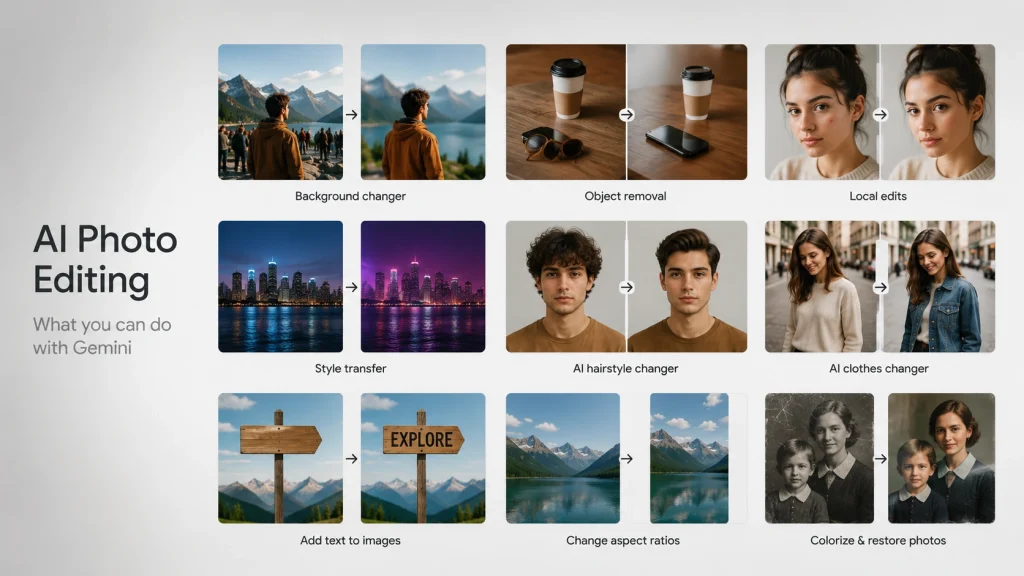
So can Gemini edit images of every kind? Not quite. Here is the capability picture in one place, based on what holds up in practice rather than the launch marketing.
| Editing task | Supported? | What to expect |
|---|---|---|
| Background changer | Yes | One of its strongest jobs |
| Object removal | Yes | Clean results on simple scenes |
| Local edits | Yes | Targeted changes to one part of an image |
| Style transfer | Yes | Fast photo transformation, retro grunge to neon lights |
| AI hairstyle changer | Yes | Reliable, helped by character consistency |
| AI clothes changer | Yes | Works well on your own photos |
| Add text to images | Yes | Strong text rendering, but still proofread it |
| Change aspect ratios | Yes | Useful for a social post or YouTube thumbnail |
| Colorize black and white photos | Partly | Plausible colors, not historically accurate ones |
| Photo restoration | Partly | Decent first pass, not archival quality |
| Face swapping | No | Blocked by safety filters |
| Editing real public figures | No | Blocked to prevent deepfakes |
| RAW camera files | No | Convert to JPEG or PNG first |
| Batch editing | No | Built for one image at a time |
On file types, Gemini accepts PNG, JPEG, WebP, HEIC, and HEIF per Google’s developer documentation. That HEIC support is genuinely useful, since iPhone photos upload without conversion, though very large HEIC files can still stall.
| If that format is new to you, our guide to what a HEIC photo is explains it. |
How to Edit a Photo in Gemini
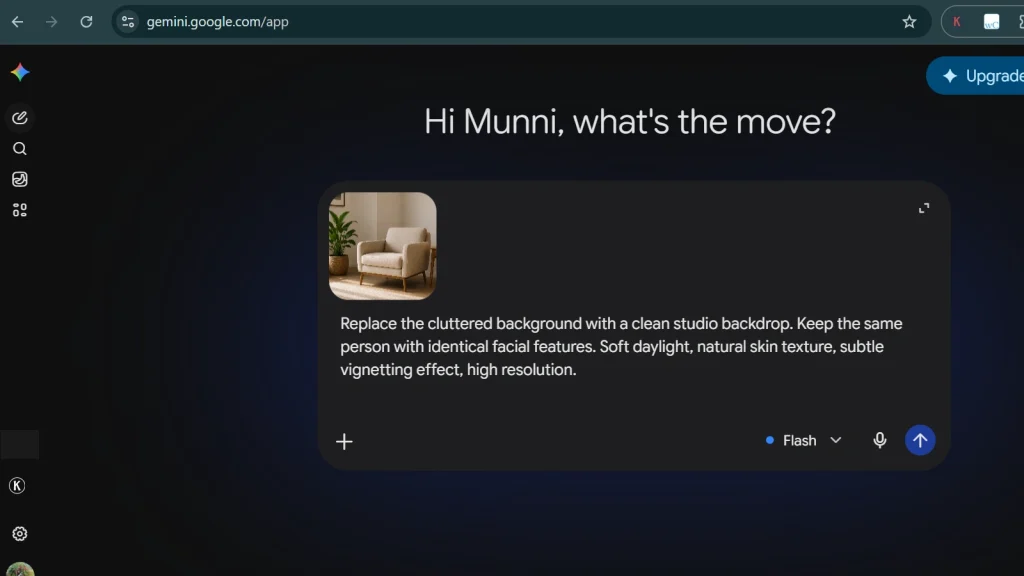
In the Gemini App
- Go to gemini.google.com or open the Gemini mobile app and start a new chat.
- Upload the photo you want to change. You can attach several reference images and ask Gemini to blend or combine them.
- Describe the edit in the text box and submit, then keep refining in the same chat so it holds context.
In Google Photos With Help Me Edit
Open a photo in the Google Photos editor and tap Help me edit. Describe the change by voice or text, or use a suggestion like make it better. Follow-up instructions build on the last result, and you can always revert to the original.
Using Draw to Edit for One Specific Area
When words alone will not isolate the spot you mean, trace the area with your finger or cursor and prompt just that region. This is how you get local edits instead of a full rebuild, and it dramatically cuts unwanted changes elsewhere in the frame.
Which Photos Work Best
Your source image decides most of the outcome. Well-lit, high-resolution shots with an uncluttered background and one clear subject give the model something solid to preserve. Blurry files, heavy compression, and several overlapping faces are where results fall apart fastest.
Weak Prompt vs Strong Prompt
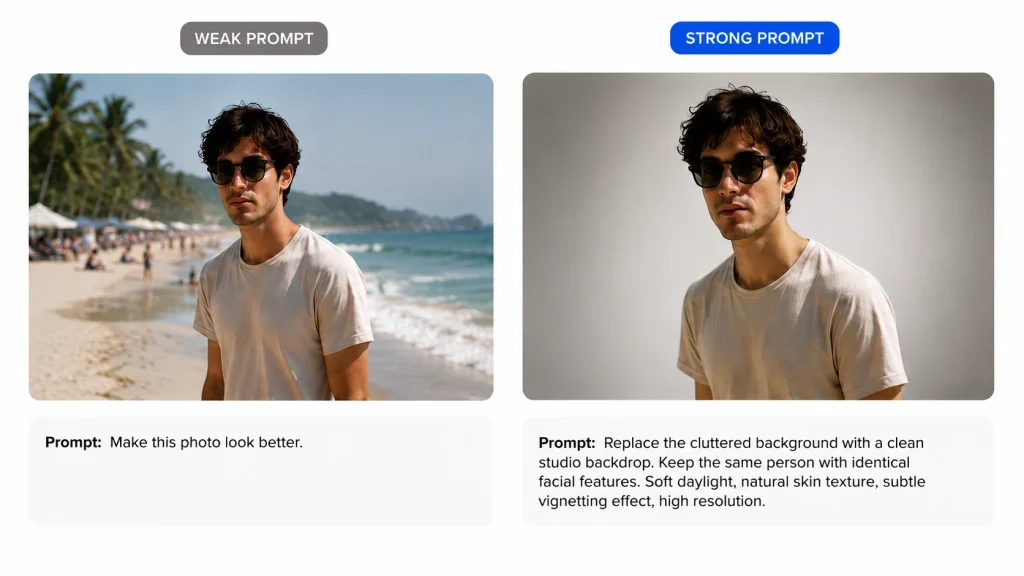
Nano Banana 2 follows instructions well, which means vague prompts get vague results and precise ones get close to what you pictured. Compare these two requests for the same photo.
Weak:
Make this photo look better.
Strong:
Replace the cluttered background with a clean studio backdrop. Keep the same person with identical facial features. Soft daylight, natural skin texture, subtle vignetting effect, high resolution.
Every added clause does a job. One names the change, one protects your identity, one sets the light, one sets the finish. Naming what must stay the same is the single habit that improves results most.
Prompt craft carries across models. Steal the five-part formula and 30+ tested examples from our ChatGPT photo editing prompts guide, then reuse the same structure in Gemini.
Why Can’t Gemini Edit My Images?
If the option is missing or your request keeps getting refused, it is usually not a bug. Google gates this feature harder than most people realise, and the rules are spread across several help pages.
- You must be 18 or older. Google states plainly that editing images is not available to users under 18.
- School and work accounts differ. Google Workspace and school accounts may face different terms or have the feature switched off entirely by an administrator.
- Google Photos has extra gates. US location, English (US) account language, Face Groups on, and location estimates enabled.
- Daily quotas apply. Free accounts run out, and hitting your Nano Banana 2 limit also blocks Redo with Pro.
- Safety filters refuse some prompts. Real people, public figures, and copyrighted characters all trigger blocks.
Match your symptom below and apply the fix.
| Problem | Likely cause | Fix |
|---|---|---|
| No editing option at all | Under 18, or a school or work account | Check your account age and type |
| Help me edit missing in Photos | Outside the US or eligibility settings off | Use the Gemini app instead |
| Edit refused outright | Safety filters on people or copyright | Reword and drop identity changes |
| A stranger appears instead of you | Identity protection fallback | Say keep the same person, same face |
| Upload fails | Oversized file or a very large HEIC | Convert to JPEG and reduce the file size |
| Ran out of edits | Daily quota reached | Wait for the reset or upgrade your plan |
Can Gemini Edit Photos of People?
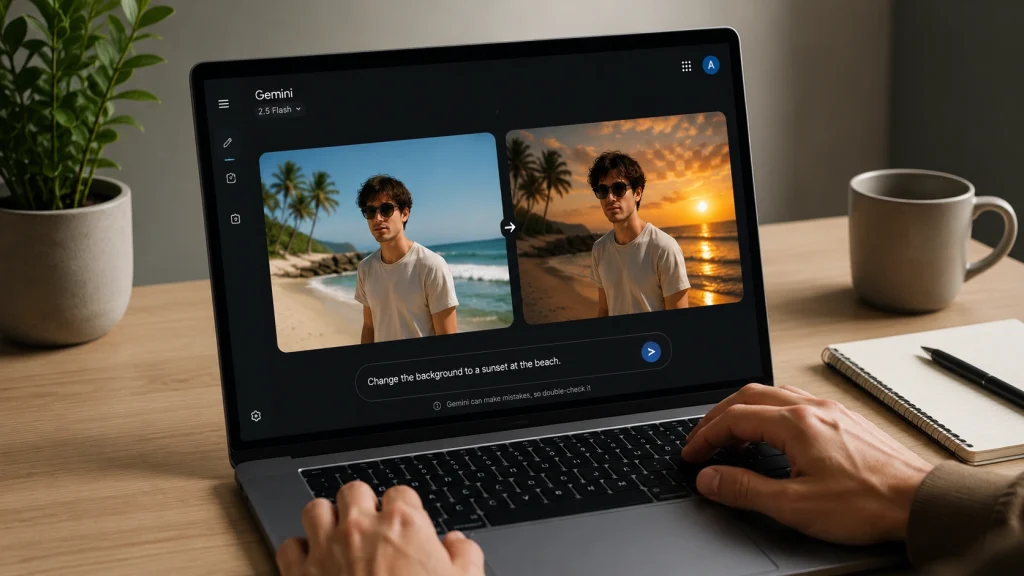
Partly, and the boundary is sharper than most guides admit. Editing your own photo is fine for plenty of tasks. Changing who someone is is not.
What works well: swapping backgrounds behind a person, changing hairstyles, trying different outfits, adjusting lighting and camera angle, and restyling a portrait. Character consistency keeps a face recognisable across several edits in the same chat.
What gets blocked: face swapping, edits to real identifiable individuals, celebrities and public figures, and anything the safety filters read as identity modification. These restrictions exist to prevent deepfakes, and they tightened noticeably through 2026.
Here is the behaviour that confuses people most. When a request drifts near an identity boundary, Gemini often does not refuse cleanly. It abandons the edit and generates a new fictional person who matches the vibe instead. That is why your photo comes back with a stranger in it.
Is Gemini Photo Editing Free?
Yes. Gemini image editing with Nano Banana 2 is available without paying, provided you meet the age and account requirements. You will hit a daily quota, and how fast depends on how demanding your edits are rather than a fixed published number.
Image resolution is the clearest free versus paid difference, and Google publishes it. You can download images at 2K with a Google AI Plan, or 1K without one. For a social post, that is fine. For anything printed or zoomed, our guide to resizing images without losing quality is worth reading first.
Watermarks, Privacy, and Commercial Use
Every Image Carries a Watermark
Gemini applies an invisible SynthID watermark to images it creates or edits, and free tier output also carries a visible Gemini logo. Photos taken or edited on recent Pixel phones add C2PA credentials that record how the image was made.
SynthID is the part that matters commercially. It is embedded at pixel level, survives cropping, and can be detected by Google’s own tools. Your image is identifiable as AI-generated whether or not a logo is visible.
SynthID means every Gemini edit carries a permanent, detectable AI signature — fine for a social post, a dealbreaker for a live product listing where buyers expect a clean, unedited-looking photo. If that’s your use case, skip the watermark question entirely with a professional edit.
Does Gemini Store Your Photos?
Uploads are processed under Google’s terms and its data policies, and activity settings govern how content may be used to improve their models. Google Workspace accounts are treated differently from personal ones. My working rule stays simple: do not upload confidential images or anything covered by a client agreement.
Can You Use Gemini Edits Commercially?
Generally yes, for images you own or have rights to, provided you follow Google’s Terms of Service and Prohibited Use Policy. Google’s permission does not override third-party rights, and copyright in purely AI-generated work remains unsettled in several countries. This is not legal advice, so confirm before anything high-stakes. For live listings, ecommerce photo editing avoids the watermark question entirely.
Where Gemini Falls Short
Precision Work
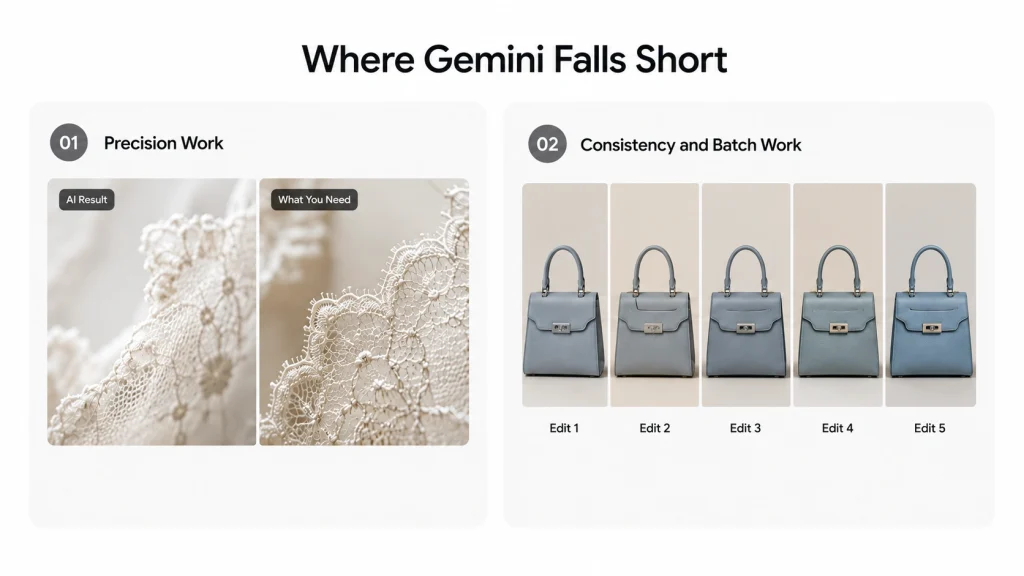
Hair, fur, lace, glass, and transparent objects still defeat it. Because the model approximates a shape rather than cutting a real path, edges come back soft or invented. That passes on social and fails in a catalog. Understanding how a clipping path works shows what AI is substituting for, and the various types of image masking cover the cases it cannot touch.
Consistency and Batch Work
Gemini handles one image at a time, and each run is a fresh roll of the dice. Hands-on tests of larger sets report edits that skip images entirely and colors that drift between them. Ten product shots come back looking like ten different shoots.
That inconsistency is the real blocker for commercial work, where a listing set has to match. It is also why keeping up with product photo editing trends matters more than chasing tools, and why many sellers outsource photo editing once volume climbs.
Gemini vs Other AI Editing Tools
Gemini is strong, but it is not automatically the right pick among AI tools. Here is where each option earns its place.
| Tool | Best for |
|---|---|
| Gemini (Nano Banana 2) | Conversational edits, style transfer, quick creative work |
| ChatGPT | Similar prompt-based editing, strong for exploring concepts |
| Photoshop Generative Fill | Precise, layered edits inside a real editor |
| Canva Magic Edit | Fast social graphics built on templates |
My own workflow drafts in an AI tool and finishes anywhere precision matters. Knowing what photo retouching actually involves makes that handoff point obvious.
Should You Use Gemini to Edit Photos?
Gemini excels at background changes, object removal, creative restyling, and quick social content. Teams in fashion and retail, interior design, and product design lean on it to sketch visual concepts before booking a shoot.
It is a weaker choice for ecommerce catalogs, pixel-perfect masking, serious restoration, and batch work. Find yourself below.
| Who you are | Good fit? | Why |
|---|---|---|
| Casual user | Yes | Free, fast, and it works on your phone |
| Content creators | Yes | Built for social posts and thumbnails |
| Graphic design work | Maybe | Fine for concepts; the watermark is a problem |
| Ecommerce seller | Maybe | Good for ideas, risky for live listings |
| Photographer | Maybe | Useful for exploring, not for client delivery |
| Print production | No | Resolution and color accuracy will not hold |
Commonly Asked Questions
Can Gemini edit my photos without changing my face?
Usually, if you ask for it directly. Add a line telling it to keep the same person with identical facial features, and repeat that on every follow-up. Character consistency in Nano Banana 2 handles the rest reasonably well.
Why does Gemini replace the person in my photo with someone else?
Your request came close to an identity modification boundary. Rather than refuse, Gemini abandons the edit and generates a fictional person instead. Reword the prompt, drop anything that reads as changing who they are, and state that the person must stay the same.
Can I edit photos in Gemini on iPhone?
Yes. The Gemini app works on iOS and iPadOS, and editing behaves the same as on Android. Google Photos conversational editing is the piece with tighter device and country limits.
The Bottom Line
So, can Gemini edit photos? Yes, and it is one of the better AI-powered tools for the job. Nano Banana 2 handles background changes, restyling, and local edits quickly, and the free tier is genuinely usable.
What holds it back is not creativity. It is the age and region gates, the watermark on every output, and the inconsistency across a set. Know those three, and you will know exactly when to prompt and when to hand the work to someone else.